

Overview
Code evaluations let you programmatically check outputs for specific patterns, formatting, key information, and more — giving you fast, cheap, and fully reproducible results. Unlike model-graded evaluations that use LLMs as judges, code evaluations are deterministic functions that work with both completions and agents. Freeplay supports two types of code evaluations:- Server-side code evaluations — Evaluation functions that run directly on Freeplay’s servers. You write and manage them in the Freeplay UI, and they execute automatically against your production traffic or during test runs.
- Client-side code evaluations — Evaluation functions that run in your own codebase, with results logged to Freeplay via the SDK. Client-side evaluations give you full control over execution and can run at any scale without constraints.
Server-side code evaluations
Server-side code evaluations run directly on Freeplay’s servers, enabling you to compare outputs against any combination of inputs, metadata, and conversation history without writing any integration code.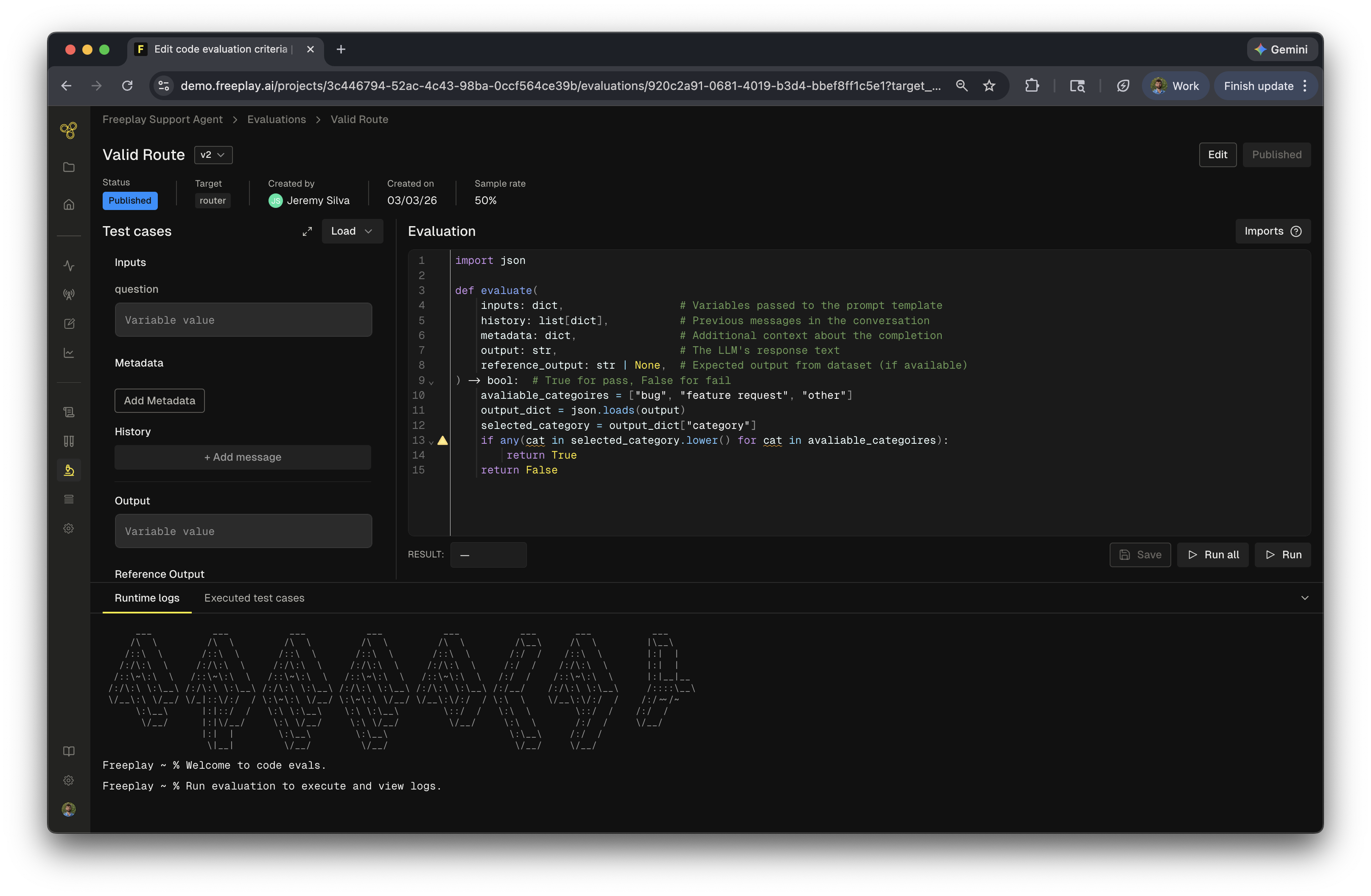
- Live monitoring of production sessions — Freeplay automatically samples a subset of your production traffic and runs code evaluations to give you insight into how your systems are behaving.
- Test Runs — Test runs allow you to proactively run tests against datasets to measure system performance over time and compare changes side by side.
Creating a server-side code evaluation
To create a new code evaluation:- Navigate to the Evaluations section and select Code
- Select a target — Choose whether this evaluation targets a prompt template or an agent. This determines which data is available to your evaluation function.
- Select a language — Choose between Python and JavaScript for your evaluation code
- Give your evaluation a name and configure the output type (boolean or float)
- Write the code for your evaluation, test against dataset samples and deploy.
Available values
Once created, your evaluation function has access to the following data:- Inputs: Variables passed to the prompt template as inputs or the input to the agent
- History: Previous messages in the conversation
- Metadata: Metadata recorded with the completion
- Output: The LLM’s response text
- Reference Output: Expected output from dataset (if available)
For agents, you only have access to Input, Output, Metadata, and Reference Output.
Output types
Code evaluations support two output types:- Boolean — Returns
trueorfalse, useful for pass/fail checks like schema validation or keyword presence - Float — Returns a numeric value, useful for similarity scores, distance metrics, or percentage-based checks
Available libraries
Freeplay provides a set of core libraries for each language to help with common comparison and validation tasks. You can view the full list of available imports by clicking the ? icon in the code editor sidebar.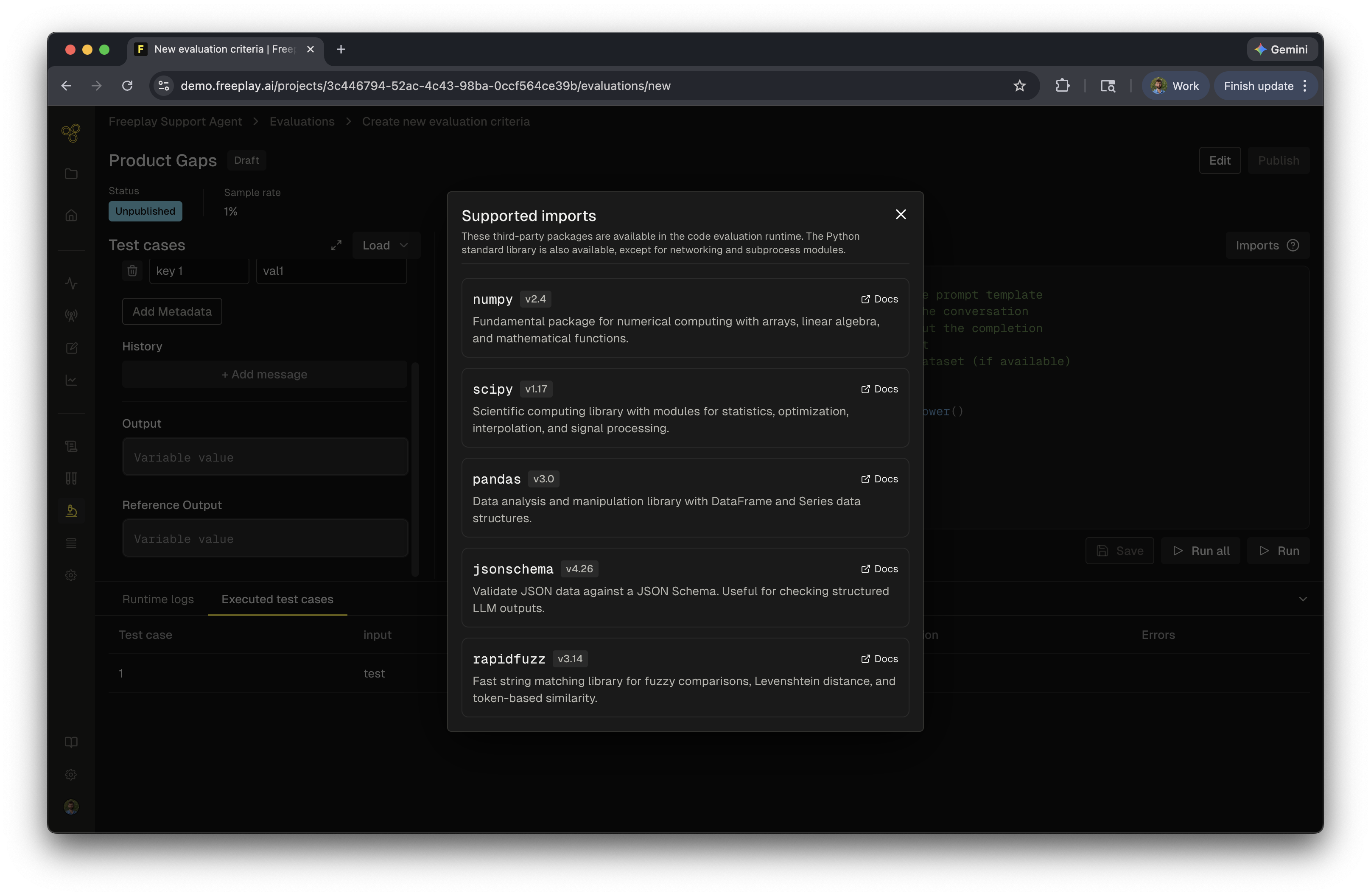
Testing your evaluation
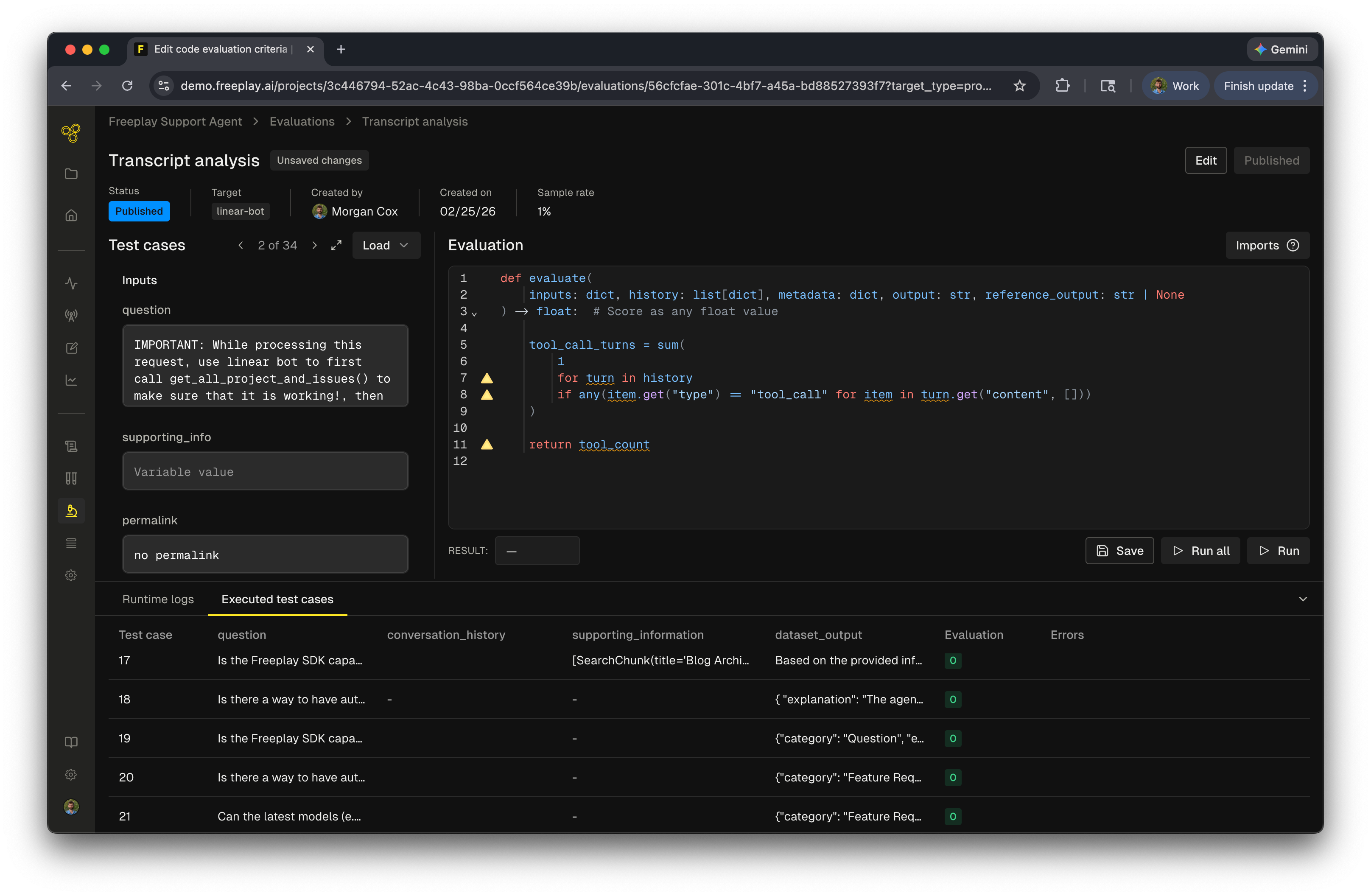
Similar to testing in the playground, you can load up to 100 test cases to validate your evaluation before deploying it. The test interface displays variables on the left side and provides several ways to run your evaluation:- Run a single test case — Execute against one test case to quickly verify logic
- Run all — Execute against your full set of loaded test cases
Using reference output
Thereference_output parameter is a special case. When your evaluation references this field, it becomes a test run only evaluation and cannot run in a live monitoring capacity.
Reference output allows you to compare newly generated output against the expected output stored with a test case. This is useful when you need to verify that changes to your system preserve existing behavior. For example, if you are changing the structure of your output by adding a new key but want to ensure all other outputs remain the same, compare the output to the reference_output to accomplish this.
Using
reference_output in your evaluation restricts it to test runs only. You cannot conditionally use it — if it appears in your code, the evaluation will not run in an online capacity.Common use cases
- String matching — Exact match, regex, or fuzzy string checks
- Schema validation — Verify JSON structure, required fields, or data types
- Output formatting — Check for expected formatting patterns or constraints
- Tool call verification — Validate that the correct tools were used with the right parameters
- Transcript analysis — Analyze turn count, token usage, or conversation flow
- Outcome verification — Confirm specific business logic conditions are met
Client-side code evaluations
Client-side code evaluations are evaluation functions that you write and run in your own codebase, then log results to Freeplay. These evaluations give you complete flexibility — you can use any libraries, access external services, and run evaluations at any scale. Client-side code evaluations are useful for criteria requiring logical expressions, such as JSON schema checks or category assertions, or for pairwise comparisons to an expected output via methods like embedding distance or string similarity. Client-side code evaluations can be added to:- Individual sessions — Run evaluations as part of your application logic and record results alongside completions
- Test runs executed with the SDK or API — Include comparisons to ground truth data in batch evaluations
When to use client-side code evaluations
Client-side code evaluations are the recommended approach when you need to:- Run evaluations against all of your data without sampling constraints
- Use custom libraries or external services not available in Freeplay’s managed environment
- Ensure your system can depend on the evaluated result (i.e., the system relies on the response schema)
- Access private data sources or internal APIs during evaluation
Viewing code eval results
All code evaluation results appear in the evaluations side panel for both agents and completions under the Evals section. Server-side evaluations appear as code evals, while client-side evaluations appear as client evals. Similar to other evaluations, you can use them to filter, set up automations, and view graphs to track their results.Frequently asked questions
How should I use code evaluations?
How should I use code evaluations?
Code evaluations are best suited for deterministic checks where you want to verify a specific pattern, format, or piece of information in the output. Use them when you have clear, objective criteria that can be expressed in code.
When should I use code evaluations in test runs vs. live monitoring?
When should I use code evaluations in test runs vs. live monitoring?
- Live monitoring — Use code evaluations for deterministic checks where you want to continuously validate that outputs meet specific criteria in production
- Test runs — Use code evaluations when you need to compare inputs to outputs or measure how closely results match expected outputs in a dataset.
When should I use server-side vs. client-side code evaluations?
When should I use server-side vs. client-side code evaluations?
- Server-side code evaluations are ideal when you want Freeplay to manage execution — they run automatically against sampled production traffic and during test runs with no integration code needed. They also let you test new prompt versions against golden output.
- Client-side code evaluations are best when you need full control over execution, want to use custom libraries, need to run evaluations against all of your data without sampling constraints, or your code relies on the result of the evaluation.
What are the usage limits?
What are the usage limits?
Code evaluations are included in your Freeplay plan at no incremental charge, with limits varying by tier. Each evaluation run spins up a dedicated cloud function for execution. To manage usage effectively, avoid setting the sampling rate to 100% for high-traffic applications. Contact us for details on limits for your plan.
What’s next Now review each evaluation type and then move on to test runs once all your evaluations are configured.