

Documentation Index
Fetch the complete documentation index at: https://docs.freeplay.ai/llms.txt
Use this file to discover all available pages before exploring further.
Reach Out For Access
Interested in BYOC? Access is limited to Enterprise customers. Please reach out to our team to get access: privacy@freeplay.ai
BYOC at a glance
Bring-Your-Own-Cloud lets you run all Freeplay services inside your own AWS, GCP, or Azure account. You keep full control over data, IAM roles, and network boundaries while Freeplay still updates and supports the software.
Why choose BYOC?
- All prompts and responses remain inside your cloud; Freeplay never receives or stores them. – Meets strict data-residency or internal-only policies.
- Reduced vendor-risk reviews – Auditors see a familiar cloud footprint that you govern.
- Same product feature velocity – Freeplay’s automated control plane delivers signed updates to the Freeplay application.
- Minimal DevOps overhead – when compared to alternative models for privately hosted software, like installing & updating Docker images and setting up & maintaining all of your own serving and database infrastructure
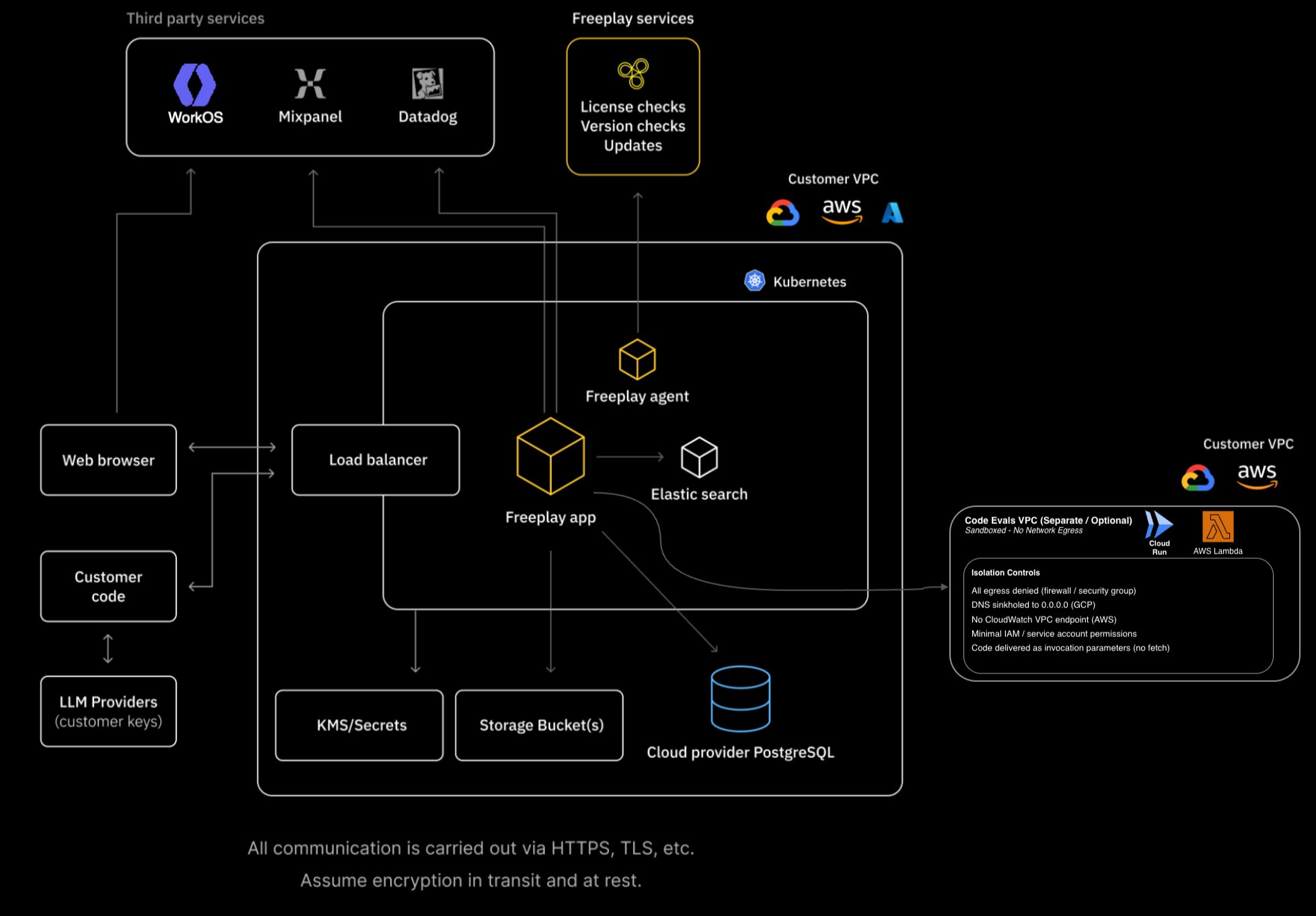
Architecture Overview
BYOC Deep Dive
How BYOC works
- Prepare your environment – create an empty AWS account, GCP project, or Azure subscription with a resource group.
- Deploy the Freeplay agent – Freeplay generates a bundle for you containing an installer script, Terraform modules, and a Replicated license. The script guides you through choosing a public or private deployment.
- Provision infrastructure – The installer uses Terraform to provision networking (VPC/VNet), managed PostgreSQL, object storage, KMS encryption, and a Kubernetes cluster. It then deploys Elasticsearch, NATS, and the Freeplay application onto the cluster.
- Stay current – all Freeplay-built Docker images are attested and verified before install. The update mechanism depends on your installation path (see below). We suggest enabling automatic updates via the KOTS admin console to ensure you receive the latest security fixes and features.
# Quick-start (all clouds)
./freeplay_up.sh
Installation paths
Freeplay supports two installation paths for deploying onto your Kubernetes cluster. The right choice depends on your team’s operational preferences and is determined during onboarding.
| Replicated KOTS | Helm CLI (OCI) |
|---|
| Best for | Teams that prefer a managed admin console with a UI for configuration and updates | Teams that prefer GitOps workflows or direct Helm control |
| Update mechanism | Replicated agent polls for releases and applies rolling upgrades automatically | Standard helm upgrade against the Freeplay OCI registry |
| Configuration | KOTS admin panel or Helm values | Helm values files |
Both paths deploy the same application stack and support the same infrastructure configurations. Freeplay will guide you through the appropriate path during onboarding.
Prerequisites
Freeplay provides Terraform that provisions everything except the cloud account/project/subscription itself. Some tweaks may apply depending on your networking architecture. Knowing your network configuration in advance helps expedite the process.
All clouds require the following CLI tools on the machine running the installer:
| Tool | Purpose |
|---|
| Terraform | Infrastructure provisioning |
| kubectl | Kubernetes management |
| psql | Database user setup |
| jq | JSON processing |
Plus the cloud-specific CLI for your provider:
| Cloud | Additional tools |
|---|
| AWS | aws CLI, session-manager-plugin (for bastion access via SSM) |
| GCP | gcloud CLI, cloud-sql-proxy |
| Azure | az CLI, kubelogin |
Infrastructure requirements
| Item | Requirement |
|---|
| Cloud project | Empty AWS account / GCP project / Azure subscription + resource group |
| Kubernetes | 1.32+ (EKS, GKE, AKS) |
| Database | Managed PostgreSQL 17 — RDS, Cloud SQL, or Azure PostgreSQL Flexible Server |
| Object storage | S3 / GCS / Azure Blob Storage (two buckets: assets and data export) |
| IAM | Deployment user/role with permissions described below; least-privilege workload roles are generated by Terraform |
| Networking | VPC/VNet with private subnets and NAT for egress; optional VPC/VNet peering or Private Service Connect |
| Outbound egress | Replicated, WorkOS, and optionally Datadog and Mixpanel (HTTPS only, see domains below) |
What gets deployed
The following services run inside your Kubernetes cluster. Default values are shown — all replica counts, resource limits, and storage sizes are configurable via the KOTS admin panel or Helm values at initial deploy and on subsequent updates.
| Component | Type | Details |
|---|
| Freeplay web app | Deployment (HPA) | Main application; scales 2–10 replicas by default |
| Index Completions | Deployment | Search indexer consuming from NATS, writing to Elasticsearch; 2 replicas |
| Data Export | CronJob | Exports event data from NATS to object storage |
| Elasticsearch | ECK-managed | Search backend; 3 replicas, 200 Gi storage per pod |
| NATS | JetStream | Message broker; 5 replicas, 10 Gi storage per pod |
Infrastructure provisioned outside the cluster:
| Component | AWS | GCP | Azure |
|---|
| Database | RDS PostgreSQL 17 | Cloud SQL PostgreSQL 17 | PostgreSQL Flexible Server 17 |
| Object storage | S3 | GCS | Blob Storage |
| Secrets | Secrets Manager | Secret Manager | Key Vault |
| Encryption | KMS | Cloud KMS | Key Vault |
| DNS | Route 53 | Cloud DNS | Azure DNS |
| TLS | ACM | Managed SSL Certificate | cert-manager / App Gateway |
AWS Services and IAM
AWS services are available by default in your account. The deployment primarily requires appropriate IAM permissions.
# AWS Services Used
## Compute & Containers
EKS (Elastic Kubernetes Service) — Auto Mode
EC2 (for NAT Gateway, SSM bastion)
## Database
RDS (PostgreSQL 17, default db.r6i.2xlarge, Multi-AZ)
## Storage
S3 (assets bucket and data-export bucket, KMS-encrypted)
## Security & Secrets
Secrets Manager (DB credentials, connection strings)
KMS (encryption at rest for S3, RDS, secrets)
IAM (IRSA for pod-level permissions)
## Networking
VPC, private and public subnets (2 AZs), NAT Gateway
Security Groups (RDS, bastion, EKS)
Optional VPC peering (cross-account, cross-region)
## DNS & Certificates
Route 53 (hosted zone)
ACM (Certificate Manager, DNS-validated)
## Monitoring
CloudWatch Logs
## Optional
Lambda (isolated-VPC code evaluation)
Bedrock IAM role (for model access)
# IAM — Deployment user/role
# Broad permissions needed during initial provisioning:
eks:*
ec2:*
rds:*
s3:*
secretsmanager:*
kms:*
iam:* (for creating IRSA roles and policies)
route53:*
acm:*
elasticloadbalancing:*
logs:*
lambda:* (if code evals enabled)
sts:AssumeRole (if Bedrock or cross-account peering)
# IAM — Pod workload identity (IRSA)
s3:PutObject, s3:GetObject, s3:ListBucket (on Freeplay buckets)
secretsmanager:GetSecretValue, secretsmanager:DescribeSecret (on DB secrets)
kms:DescribeKey, kms:Encrypt, kms:Decrypt, kms:ReEncrypt*,
kms:GenerateDataKey, kms:GenerateDataKeyWithoutPlaintext
# IAM — External-DNS (IRSA)
route53:ChangeResourceRecordSets
route53:ListHostedZones, route53:ListResourceRecordSets
# IAM — Bedrock (optional)
bedrock:InvokeModel, bedrock:InvokeModelWithResponseStream
sts:AssumeRole (to assume Bedrock role)
Google Cloud APIs and IAM
The ./freeplay_up.sh script validates required APIs and the Terraform modules enable them automatically during provisioning. We recommend keeping resources isolated by project.
# Required Google Cloud APIs
## Compute & Containers
compute.googleapis.com
container.googleapis.com
## IAM & Workload Identity
iam.googleapis.com
## Database
sqladmin.googleapis.com
## Secrets & Encryption
secretmanager.googleapis.com
cloudkms.googleapis.com
## DNS & TLS
dns.googleapis.com
certificatemanager.googleapis.com
servicenetworking.googleapis.com
## Storage
storage.googleapis.com
## AI / LLM Access
aiplatform.googleapis.com
generativelanguage.googleapis.com
## Networking (peering / PSC scenarios)
networksecurity.googleapis.com
networkmanagement.googleapis.com
servicedirectory.googleapis.com
## Code Evaluation (optional)
cloudbuild.googleapis.com
artifactregistry.googleapis.com
cloudfunctions.googleapis.com
run.googleapis.com
vpcaccess.googleapis.com
# IAM — Terraform service account (deployment)
roles/editor
roles/compute.networkAdmin
roles/cloudkms.admin
roles/secretmanager.admin
roles/cloudsql.admin
roles/container.admin
roles/storage.admin
roles/iam.serviceAccountAdmin
roles/resourcemanager.projectIamAdmin
roles/serviceusage.serviceUsageAdmin
# The user running the installer also needs:
roles/iam.serviceAccountTokenCreator (on the Terraform service account)
# IAM — GKE node service accountroles/logging.logWriter
roles/monitoring.metricWriter
roles/monitoring.viewer
roles/stackdriver.resourceMetadata.writer
roles/storage.objectViewer
# IAM — Freeplay app workload identityroles/monitoring.metricWriter
roles/storage.objectAdmin
roles/logging.logWriter
roles/cloudsql.client
# IAM — External-DNS workload identityroles/dns.admin
Azure Resource Providers and Roles
These resource providers must be registered in your Azure subscription. The ./freeplay_up.sh script checks for and registers them before running Terraform.
# Resource Providers that must be registered
## Compute & Containers
Microsoft.ContainerService
Microsoft.Compute
## Networking
Microsoft.Network
## Secrets & Encryption
Microsoft.KeyVault
## Storage
Microsoft.Storage
## Database
Microsoft.DBforPostgreSQL
## Identity
Microsoft.ManagedIdentity
## Monitoring
Microsoft.OperationalInsights
# Azure Roles
## For the deployment service principal or user
Contributor (on resource group)
User Access Administrator (on resource group)
## For the AKS workload identity (user-assigned managed identity)
Key Vault access policy: Get/List secrets, Get/List/Encrypt/Decrypt/WrapKey/UnwrapKey keys
Storage Blob Data Contributor (on storage accounts)
DNS Zone Contributor (on DNS zone)
Network Contributor (on VNet)
## For AKS cluster admins
Azure Kubernetes Service RBAC Cluster Admin (on AKS cluster)
Security & compliance
- Data residency – all sensitive customer data including prompts, responses, and evaluations stay in your cloud account. Optional ability to share support bundles for troubleshooting scenarios.
- Secrets – stored in your cloud KMS-backed secret manager (AWS Secrets Manager, GCP Secret Manager, or Azure Key Vault); never transmitted to Freeplay.
- Encryption – data at rest is encrypted with cloud KMS keys provisioned in your account. Keys rotate automatically every 90 days on all three clouds.
- Network isolation – databases are deployed on private subnets only, with no public IP. Kubernetes API servers can be made private with VPC/VNet peering.
- Least-privilege IAM – Terraform creates workload-identity bindings (IRSA, GCP Workload Identity, Azure Managed Identity) scoped to only the resources each service needs.
- Updates – all Freeplay-built Docker images are attested and verified before install; only metadata (version, health ping) is sent to the control plane.
- Configurable defaults – the Terraform modules expose variables for database backups and retention, high-availability mode, deletion protection, VPC flow logs, network policies, and more. Defaults are production-ready, but every knob is tunable to match your security and compliance requirements.
Costs
- Freeplay subscription – BYOC is available only for Enterprise-tier contracts. Please contact Sales for more info about access.
- Your cloud – you pay for all compute nodes, database, Elasticsearch storage, object storage, and egress. Typical mid-sized install runs approximately 1.2k–2k/mo in AWS us-east-1.
BYOC Outbound Egress Requirements
All outbound traffic uses port 443 / HTTPS (TLS 1.2+).
1. WorkOS Authentication (Required)
| |
|---|
| Domains | *.authkit.app, *.workos.com |
| Purpose | User authentication and authorization |
| Data transmitted | User email |
| IP ranges | Cloudflare published ranges — see WorkOS On-Prem Deployment and Cloudflare IPs |
2. Replicated (Conditional)
| |
|---|
| Domains | *.replicated.com, *.replicated.app |
| Purpose | Agent polls for signed application & infrastructure releases |
| Data transmitted | Agent ID, current version, signed artifacts |
| IP ranges | replicatedhq/ips |
| Firewall rules | Replicated Customer Firewalls |
3. Datadog (Conditional)
| |
|---|
| Domains | *.datadoghq.com (regional endpoints) |
| Purpose | Metrics and traces for 24×7 ops SLA |
| Data transmitted | Health metrics, cluster stats, anonymous performance metrics, scrubbed logs (no prompt/response content) |
| IP ranges | ip-ranges.datadoghq.com |
4. LLM Provider Endpoints (Conditional)
| |
|---|
| Domains | Provider-specific (e.g., api.openai.com, bedrock-runtime.*, *.anthropic.com, Azure OpenAI endpoints) |
| Purpose | Inference calls initiated by Freeplay application |
| Data transmitted | Prompts, context, parameters, model responses |
| Required? | Yes, if you use external hosted models |
| How to restrict | Use VPC endpoints or Private Link where the provider offers them |
5. Mixpanel (Optional)
| |
|---|
| Domains | *.mixpanel.com |
| Purpose | Product-usage analytics (UX insights) |
| Data transmitted | Anonymous instance ID, UI events (no sensitive prompt/response data) |
| How to disable | Set the Mixpanel token to empty via the KOTS admin panel or Helm values |
Destinations 1 and 2 are always required for a supported install. 3 is strongly recommended. Destination 4 is required only when your workloads invoke external hosted models — BYOC also supports running local/on-site models if you need zero data egress for LLM traffic.
Key Points
- You decide which LLM providers and regions to enable in the Freeplay UI.
- All calls use HTTPS (TLS 1.2+). AWS enforces TLS 1.3 via
ELBSecurityPolicy-TLS13-1-2-PQ-2025-09. GCP enforces a RESTRICTED SSL policy. Azure supports TLS 1.2 and TLS 1.3.
- Freeplay’s log policy prevents user content from landing in Datadog.
- If you need a completely offline install, talk to us. An artifact-mirror and on-prem observability stack are on the roadmap.
FAQ
| Question | Answer |
|---|
| Can we air-gap entirely? | Not yet. The Replicated agent needs periodic egress for updates and license checks. |
| Is bring-your-own KMS supported? | Yes. All encryption keys are stored on a KMS in your account (AWS KMS, GCP Cloud KMS, or Azure Key Vault). GCP supports configurable protection levels (SOFTWARE or HSM). |
| What about bring-your-own VPC or cluster? | Yes. Terraform variables let you supply an existing VPC/VNet (create_vpc = false) and an existing Kubernetes cluster (create_eks_cluster, create_gke_cluster, or create_aks_cluster = false). You can also bring your own DNS zone and security groups. While a vanilla deployment is easiest, BYOC adapts to pre-established networking rules. |
| Can I scale horizontally? | The Helm values file exposes replicas and resource limits. The Freeplay web app uses a Horizontal Pod Autoscaler (default 2–10 replicas, scaling on CPU and memory). Elasticsearch (3 replicas) and NATS (5 replicas) are also configurable. |
| Private-only access? | Yes. The installer script asks whether you want public or internal-only load balancing. For private access, you can use VPC/VNet peering or Private Service Connect (GCP). When peering is enabled, GCP additionally provisions Cloud Armor rules to restrict traffic to known CIDR ranges. |
| Is the site reachable from the public Internet? | We can provision either a public internet site, or create a private site that is only resolvable or firewalled to your virtual network or connection. |
| What persistent storage is part of this deployment? | Managed PostgreSQL (RDS / Cloud SQL / Azure PostgreSQL Flexible Server) for the source of truth. S3 / GCS / Blob Storage for multi-modal artifacts and data export. Block storage (EBS / Persistent Disk / Azure Managed Disk) for Elasticsearch indices (default 200 Gi per pod) and NATS JetStream (default 10 Gi per pod). Storage sizes are configurable via the KOTS admin panel or Helm values. |
| I’ve heard Kubernetes can be unreliable with persistent volumes. Does that put my data at risk? | No. BYOC keeps the source-of-truth in a managed database service (RDS, Cloud SQL, or Azure PostgreSQL Flexible Server) that runs outside Kubernetes. Everything on in-cluster volumes (search indices, NATS JetStream, temporary files) can be rebuilt from that database. If a node or the whole cluster is lost, you spin up new nodes, redeploy the chart, and point it at the same database. The application comes back with no data loss. |
| Can I use an existing Elasticsearch instance? | Yes. Set elasticSearch.enabled: false in the Helm values and provide your external host via freeplay.ELASTIC_HTTP_HOST, bypassing the in-cluster ECK deployment. |
| Is there a Terraform backend? | Yes. State is stored in an S3 bucket (or GCS / Azure Blob equivalent) in your cloud account, so the Terraform state stays within your security perimeter. |
| What about code evaluation? | Code evaluation is an optional feature available on AWS (Lambda in an isolated VPC with no egress) and GCP (Cloud Functions with Private Service Connect, egress-deny firewall rules, and DNS blocking). Contact us for details. |
| Can I preview the Terraform and networking rules / IAM policies? | Yes, please contact us. |