

Setting up in the prompt playground
To use the Responses API with a prompt template in Freeplay:- Open your prompt template in the Prompt Playground
- Select a compatible OpenAI model (e.g.
gpt-5.x,gpt-4.x) - Open Model Settings
- Change the API Format to Responses
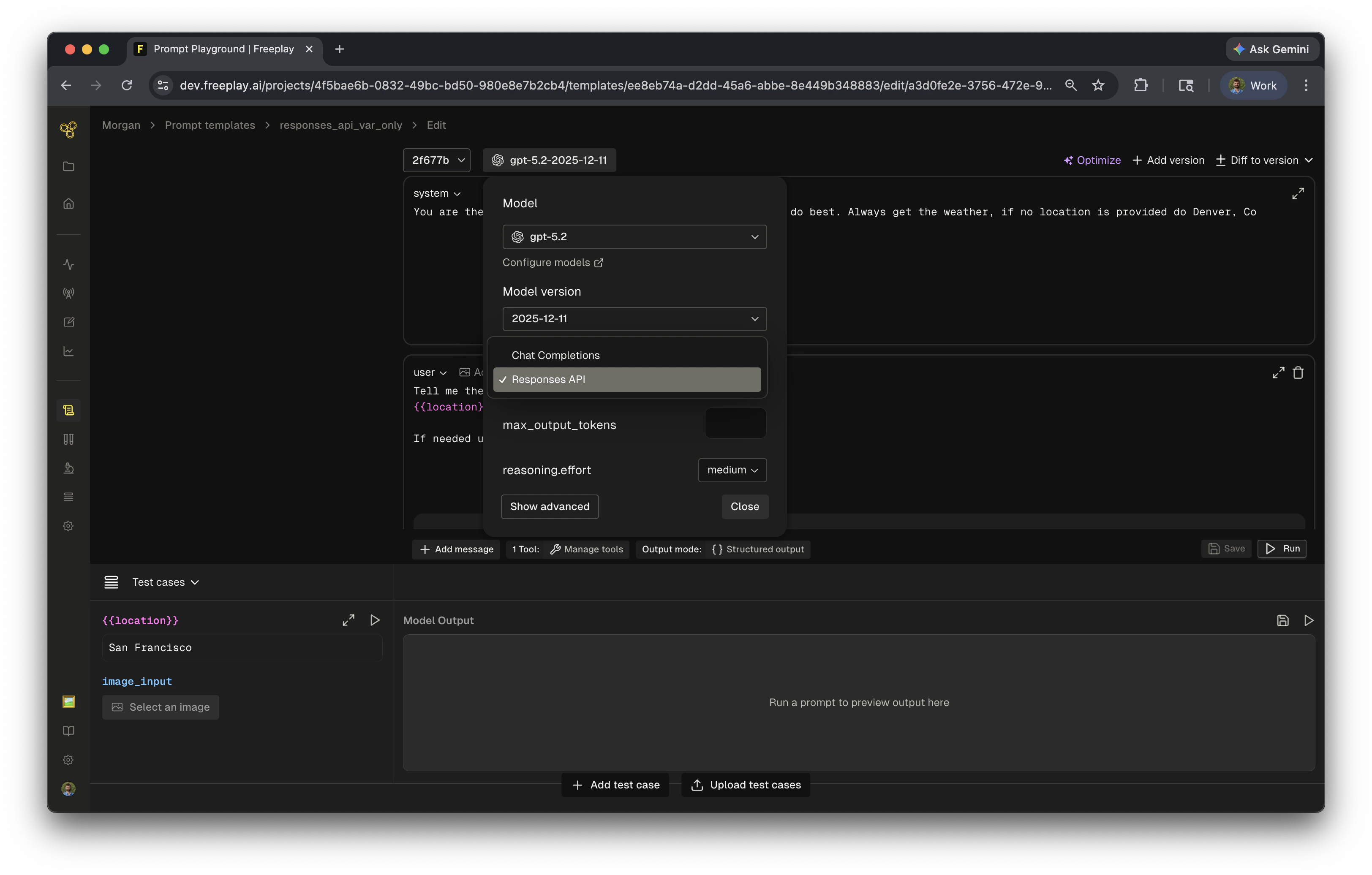
formatted_prompt.llm_prompt returns the input array expected by openai.responses.create() instead of the chat completions message format.
How it works
When the API Format is set to Responses API:formatted_prompt.llm_promptreturns theinputarray forresponses.create()formatted_prompt.system_contentreturns the system instructions (passed asinstructions)formatted_prompt.tool_schemareturns tools in the Responses API formatformatted_prompt.formatted_output_schemareturns the JSON schema for structured outputsformatted_prompt.prompt_info.model_parameterscontains model settings liketemperature
1. Setup clients
Initialize Freeplay and OpenAI client SDKs.2. Fetch prompt from Freeplay
Pull in the formatted prompt. Since the API Format is set to Responses API, the prompt is formatted accordingly.3. Build the Responses API call
Map the formatted prompt fields to the Responses API parameters —instructions, tools, structured output text format, etc.
4. Call OpenAI Responses API
Pass the formatted input and parameters toopenai.responses.create().
5. Handle the response
The Responses API returns anoutput array. Iterate through it to handle text outputs and tool calls.
6. Record the interaction
Pass the messages, tool schema, and media inputs back to Freeplay for observability.Examples
import base64
import json
import os
import time
from pathlib import Path
from typing import Any, Dict, Optional

from openai import OpenAI

from freeplay import Freeplay, RecordPayload, CallInfo
from freeplay.model import MediaInputBase64
from freeplay.resources.recordings import UsageTokens

## SETUP ##
fp_client = Freeplay(
    freeplay_api_key=os.environ["FREEPLAY_API_KEY"],
    api_base=f"{os.environ['FREEPLAY_API_URL']}/api",
)
openai_client = OpenAI(api_key=os.environ["OPENAI_API_KEY"])

project_id = os.environ["FREEPLAY_PROJECT_ID"]
input_variables = {"location": "San Francisco"}

## IMAGE INPUT (OPTIONAL) ##
image_url: Optional[str] = None  # Set to an image file path to include an image input
media_inputs = {}
if image_url:
    image_path = Path(image_url)
    with open(image_path, "rb") as f:
        encoded_image = base64.b64encode(f.read()).decode("utf-8")
    media_inputs["image_input"] = MediaInputBase64(
        type="base64",
        content_type="image/jpeg",
        data=encoded_image,
    )

## PROMPT FETCH ##
formatted_prompt = fp_client.prompts.get_formatted(
    project_id=project_id,
    template_name="my-openai-prompt",
    environment="latest",
    variables=input_variables,
    media_inputs=media_inputs if media_inputs else None,
)

## BUILD RESPONSES API PARAMS ##
response_params: Dict[str, Any] = {
    **formatted_prompt.prompt_info.model_parameters,
}
if formatted_prompt.system_content:
    response_params["instructions"] = formatted_prompt.system_content
if formatted_prompt.tool_schema:
    response_params["tools"] = formatted_prompt.tool_schema
if formatted_prompt.formatted_output_schema:
    response_params["text"] = {
        "format": {
            "type": "json_schema",
            "strict": True,
            "schema": formatted_prompt.formatted_output_schema,
            "name": "structured_output",
        }
    }

## LLM CALL ##
start = time.time()
completion = openai_client.responses.create(
    input=formatted_prompt.llm_prompt,
    model=formatted_prompt.prompt_info.model,
    **response_params,
)
end = time.time()

## HANDLE RESPONSE ##
messages = [*formatted_prompt.llm_prompt]
for output in completion.output:
    if output.type == "function_call":
        tool_name = output.name
        tool_args = output.arguments
        tool_id = output.id
        # Replace with your actual tool implementation
        tool_result = "70 and sunny"
        messages = [
            *messages,
            {
                "role": "user",
                "content": str(tool_result),
                "tool_call_id": tool_id,
                "name": tool_name,
            },
            {
                "role": "assistant",
                "content": None,
                "tool_calls": [
                    {
                        "id": tool_id,
                        "function": {
                            "name": tool_name,
                            "arguments": json.dumps(tool_args),
                        },
                        "type": "function",
                    }
                ],
            },
        ]
    elif output.type == "output_text":
        messages = [
            *messages,
            {"role": "assistant", "content": str(output.content[0].text)},
        ]

## RECORD ##
session = fp_client.sessions.create()
call_info = CallInfo.from_prompt_info(
    formatted_prompt.prompt_info,
    start,
    end,
    UsageTokens(completion.usage.input_tokens, completion.usage.output_tokens),
)

fp_client.recordings.create(
    RecordPayload(
        project_id=project_id,
        all_messages=messages,
        session_info=session.session_info,
        inputs=input_variables,
        prompt_version_info=formatted_prompt.prompt_info,
        call_info=call_info,
        tool_schema=formatted_prompt.tool_schema,
        media_inputs=media_inputs if media_inputs else None,
    )
)
import Freeplay, { getCallInfo, getSessionInfo } from "freeplay";
import OpenAI from "openai";
import fs from "fs";

// SETUP //
const fpClient = new Freeplay({
  freeplayApiKey: process.env["FREEPLAY_API_KEY"],
  baseUrl: process.env["FREEPLAY_API_URL"],
});
const openaiClient = new OpenAI({ apiKey: process.env["OPENAI_API_KEY"] });

const projectId = process.env["FREEPLAY_PROJECT_ID"];
const inputVariables = { location: "San Francisco" };

// IMAGE INPUT (OPTIONAL) //
const imageUrl = null; // e.g. "/path/to/image.jpg"
const mediaInputs = {};
if (imageUrl) {
  const encoded = fs.readFileSync(imageUrl).toString("base64");
  mediaInputs["image_input"] = {
    type: "base64",
    contentType: "image/jpeg",
    data: encoded,
  };
}

// PROMPT FETCH //
const formattedPrompt = await fpClient.prompts.getFormatted({
  projectId,
  templateName: "my-openai-prompt",
  environment: "latest",
  variables: inputVariables,
  ...(Object.keys(mediaInputs).length > 0 ? { media: mediaInputs } : {}),
});

// BUILD RESPONSES API PARAMS //
const responseParams = {
  ...(formattedPrompt.promptInfo.modelParameters || {}),
};
if (formattedPrompt.systemContent) {
  responseParams.instructions = formattedPrompt.systemContent;
}
if (formattedPrompt.toolSchema) {
  responseParams.tools = formattedPrompt.toolSchema;
}
if (formattedPrompt.outputSchema) {
  responseParams.text = {
    format: {
      type: "json_schema",
      strict: true,
      schema: formattedPrompt.outputSchema,
      name: "structured_output",
    },
  };
}

// LLM CALL //
const startTime = new Date();
const completion = await openaiClient.responses.create({
  input: formattedPrompt.llmPrompt,
  model: formattedPrompt.promptInfo.model,
  ...responseParams,
});
const endTime = new Date();

// HANDLE RESPONSE //
let messages = [...formattedPrompt.llmPrompt];

for (const output of completion.output) {
  if (output.type === "function_call") {
    const toolName = output.name;
    const toolArgs = output.arguments;
    const toolId = output.id;
    // Replace with your actual tool implementation
    const toolResult = "70 and sunny";
    messages = [
      ...messages,
      {
        role: "user",
        content: String(toolResult),
        tool_call_id: toolId,
        name: toolName,
      },
      {
        role: "assistant",
        content: null,
        tool_calls: [
          {
            id: toolId,
            function: {
              name: toolName,
              arguments: JSON.stringify(toolArgs),
            },
            type: "function",
          },
        ],
      },
    ];
  } else if (output.type === "output_text") {
    messages = [
      ...messages,
      { role: "assistant", content: String(output.content[0].text) },
    ];
  }
}

// RECORD //
const session = fpClient.sessions.create();
const callInfo = getCallInfo(
  formattedPrompt.promptInfo,
  startTime,
  endTime,
  {
    promptTokens: completion.usage.input_tokens,
    completionTokens: completion.usage.output_tokens,
  },
);

await fpClient.recordings.create({
  projectId,
  allMessages: messages,
  sessionInfo: getSessionInfo(session),
  inputs: inputVariables,
  promptVersionInfo: formattedPrompt.promptInfo,
  callInfo,
  toolSchema: formattedPrompt.toolSchema,
  ...(Object.keys(mediaInputs).length > 0 ? { mediaInputs } : {}),
});
import ai.freeplay.client.Freeplay;
import ai.freeplay.client.media.MediaInputCollection;
import ai.freeplay.client.resources.prompts.ChatMessage;
import ai.freeplay.client.resources.prompts.FormattedPrompt;
import ai.freeplay.client.resources.prompts.PromptInfo;
import ai.freeplay.client.resources.prompts.Prompts;
import ai.freeplay.client.resources.recordings.CallInfo;
import ai.freeplay.client.resources.recordings.RecordPayload;
import ai.freeplay.client.resources.recordings.RecordResponse;
import ai.freeplay.client.resources.sessions.Session;
import com.fasterxml.jackson.databind.JsonNode;
import com.fasterxml.jackson.databind.ObjectMapper;
import com.fasterxml.jackson.databind.node.ArrayNode;
import com.fasterxml.jackson.databind.node.ObjectNode;

import java.net.URI;
import java.net.http.HttpClient;
import java.net.http.HttpRequest;
import java.net.http.HttpResponse;
import java.util.ArrayList;
import java.util.List;
import java.util.Map;

import static ai.freeplay.client.Freeplay.Config;

public class OpenAIResponsesApi {

    private static final ObjectMapper mapper = new ObjectMapper();
    private static final HttpClient http = HttpClient.newHttpClient();

    /* SETUP */
    static final String FREEPLAY_API_KEY = System.getenv("FREEPLAY_API_KEY");
    static final String OPENAI_API_KEY   = System.getenv("OPENAI_API_KEY");
    static final String PROJECT_ID       = System.getenv("FREEPLAY_PROJECT_ID");
    static final String API_BASE         = System.getenv("FREEPLAY_API_URL");

    static final Freeplay fpClient = new Freeplay(Config()
            .freeplayAPIKey(FREEPLAY_API_KEY)
            .baseUrl(API_BASE));

    public static void main(String[] args) throws Exception {
        Map<String, Object> inputVariables = Map.of("location", "San Francisco");

        /* PROMPT FETCH */
        FormattedPrompt<?> prompt = fpClient.prompts()
                .getFormatted(new Prompts.GetFormattedRequest(
                        PROJECT_ID, "my-openai-prompt", "latest", inputVariables)
                        .mediaInputs(new MediaInputCollection()))
                .get();

        PromptInfo promptInfo = prompt.getPromptInfo();
        String systemContent = prompt.getSystemContent().orElse(null);
        @SuppressWarnings("unchecked")
        List<ChatMessage> boundMessages = (List<ChatMessage>) prompt.getBoundMessages();
        List<Map<String, Object>> toolSchema = prompt.getToolSchema();
        Map<String, Object> outputSchema = prompt.getOutputSchema();

        /* BUILD RESPONSES API REQUEST */
        ObjectNode body = mapper.createObjectNode();
        body.put("model", promptInfo.getModel());

        ArrayNode inputArray = mapper.createArrayNode();
        for (ChatMessage msg : boundMessages) {
            if (!"system".equals(msg.getRole())) {
                inputArray.add(mapper.createObjectNode()
                        .put("role", msg.getRole())
                        .put("content", msg.getContent()));
            }
        }
        body.set("input", inputArray);

        if (promptInfo.getModelParameters() != null) {
            promptInfo.getModelParameters().forEach((k, v) ->
                    body.set(k, mapper.valueToTree(v)));
        }
        if (systemContent != null)
            body.put("instructions", systemContent);
        if (toolSchema != null && !toolSchema.isEmpty())
            body.set("tools", mapper.valueToTree(toolSchema));
        if (outputSchema != null && !outputSchema.isEmpty()) {
            body.set("text", mapper.valueToTree(Map.of(
                    "format", Map.of(
                            "type", "json_schema",
                            "strict", true,
                            "schema", outputSchema,
                            "name", "structured_output"))));
        }

        /* LLM CALL */
        long start = System.currentTimeMillis();
        HttpResponse<String> response = http.send(
                HttpRequest.newBuilder()
                        .uri(URI.create("https://api.openai.com/v1/responses"))
                        .header("Content-Type", "application/json")
                        .header("Authorization", "Bearer " + OPENAI_API_KEY)
                        .POST(HttpRequest.BodyPublishers.ofString(
                                mapper.writeValueAsString(body)))
                        .build(),
                HttpResponse.BodyHandlers.ofString());
        long end = System.currentTimeMillis();

        JsonNode responseBody = mapper.readTree(response.body());

        if (response.statusCode() != 200)
            throw new RuntimeException(
                    "OpenAI error " + response.statusCode() + ": " + response.body());

        /* HANDLE RESPONSE */
        List<ChatMessage> allMessages = new ArrayList<>(boundMessages);

        for (JsonNode item : responseBody.get("output")) {
            String type = item.path("type").asText();

            if ("function_call".equals(type)) {
                String toolName = item.path("name").asText();
                String toolArgs = item.path("arguments").asText();
                String toolId   = item.path("call_id").asText();

                // Replace with your actual tool implementation
                allMessages.add(new ChatMessage("user", "70 and sunny"));
                allMessages.add(new ChatMessage(Map.of(
                        "role", "assistant",
                        "content", "",
                        "tool_calls", List.of(Map.of(
                                "id", toolId,
                                "function", Map.of(
                                        "name", toolName,
                                        "arguments", toolArgs),
                                "type", "function")))));

            } else if ("message".equals(type)) {
                for (JsonNode part : item.path("content")) {
                    if ("output_text".equals(part.path("type").asText()))
                        allMessages.add(new ChatMessage(
                                "assistant", part.path("text").asText()));
                }
            }
        }

        /* RECORD */
        Session session = fpClient.sessions().create();

        JsonNode usage = responseBody.get("usage");
        int inTok  = usage != null ? usage.path("input_tokens").asInt(0) : 0;
        int outTok = usage != null ? usage.path("output_tokens").asInt(0) : 0;

        CallInfo callInfo = CallInfo.from(promptInfo, start, end)
                .usage(new CallInfo.UsageTokens(outTok, inTok))
                .apiStyle(CallInfo.ApiStyle.BATCH);

        RecordPayload record = new RecordPayload(PROJECT_ID, allMessages)
                .sessionInfo(session.getSessionInfo())
                .inputs(inputVariables)
                .promptVersionInfo(promptInfo)
                .callInfo(callInfo)
                .toolSchema(toolSchema);

        RecordResponse recorded = fpClient.recordings().create(record).get();
    }
}