Connect Freeplay to your AI application for observability, evaluations, and prompt management
Integrating Freeplay with your application unlocks the full platform: production monitoring, dataset creation from real traffic, online and offline evaluations, and optional prompt deployment.
Pattern 1: Freeplay manages your prompts (recommended)
Freeplay becomes the source of truth for your prompt templates. Your application fetches prompts from Freeplay either at runtime, or as part of your build process (or both).Benefits:
Non-engineers can iterate on prompts without code changes
Deploy prompt updates like feature flags
Automatic versioning and environment promotion
Full observability with prompt input variables linked to evaluations
Best for: Teams that want to empower PMs, domain experts, or anyone else to iterate on prompts independently of code.Note that you can configure your Freeplay client to retrieve prompts at runtime, or as part of your build process (learn more about “prompt bundling”). Many Freeplay customers retrieve prompts at runtime in lower-level environments like dev or staging for fast server-side experimentation, then use prompt bundling in production for tighter release management.
Your prompts live in your codebase. You sync prompt templates to Freeplay to organize your observability data.Benefits:
Prompts stay entirely in your code
Use your existing code review process for prompt changes
Full flexibility over prompt structure
Best for: Teams with strict infrastructure-as-code requirements, or those who prefer prompts versioned alongside application code.
Both patterns still require creating prompt templates in Freeplay. The difference is whether your application fetches prompt configurations from Freeplay (Pattern 1) or logs prompts defined in code (Pattern 2).
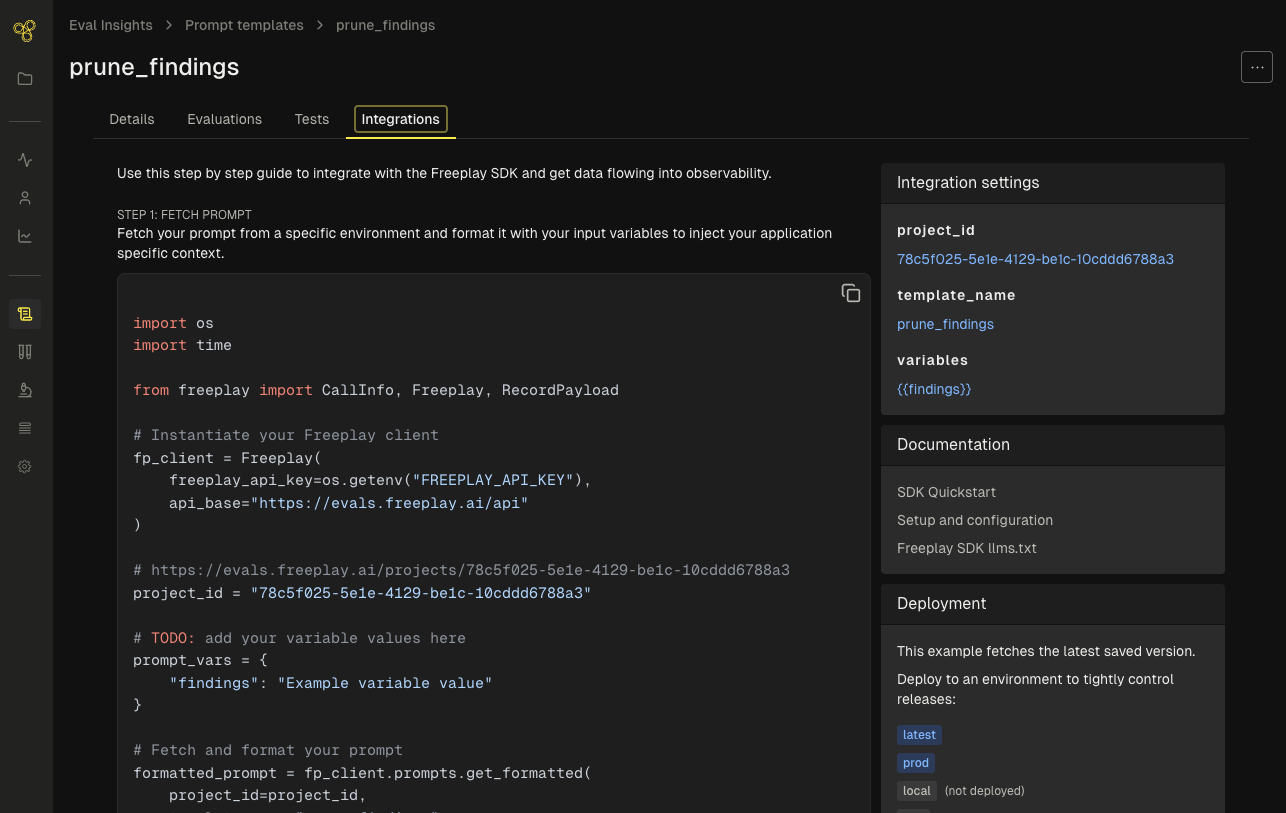
Create your first prompt template in the UI. See Start in the UI for a walkthrough.Once you save a prompt, the Integration tab provides code snippets tailored to your template.
from freeplay import Freeplay, RecordPayload, CallInfofrom openai import OpenAIimport osfp_client = Freeplay( freeplay_api_key=os.getenv("FREEPLAY_API_KEY"), api_base="https://app.freeplay.ai/api")openai_client = OpenAI()project_id = os.getenv("FREEPLAY_PROJECT_ID")## YOUR PROMPT (defined in code) ##prompt_vars = {"user_name": "Alice", "topic": "weather"}messages = [ {"role": "system", "content": "You are a helpful assistant."}, {"role": "user", "content": f"Hi {prompt_vars['user_name']}, tell me about {prompt_vars['topic']}."}]## LLM CALL ##model = "gpt-4.1-mini"response = openai_client.chat.completions.create( model=model, messages=messages)## RECORD ##all_messages = messages + [ {"role": "assistant", "content": response.choices[0].message.content}]fp_client.recordings.create( RecordPayload( project_id=project_id, all_messages=all_messages, inputs=prompt_vars, # Variables enable dataset creation call_info=CallInfo(provider="openai", model=model) ))
To fully unlock Freeplay features like searching by prompt template and version-based observability, sync your code prompts to Freeplay using the API. See Sync prompts from code for details.