> ## Documentation Index
> Fetch the complete documentation index at: https://docs.freeplay.ai/llms.txt
> Use this file to discover all available pages before exploring further.
# Voice-Enabled AI with Pipecat, Twilio, and Freeplay
> Build and monitor voice-enabled AI applications using Pipecat, Twilio, and Freeplay.
## Introduction
Voice-enabled AI applications present unique challenges when it comes to testing, monitoring, and iterating on your prompts and models. This guide demonstrates how Freeplay's observability and prompt management tools can support your development workflow when building voice applications.
In this example, we show how to use Freeplay together with Pipecat and Twilio.
## What is Pipecat?
[Pipecat](https://docs.pipecat.ai/getting-started/overview) is a powerful open source framework for building voice-enabled, real-time, multimodal AI applications.
When paired with [Twilio](https://www.twilio.com/en-us) for real-time voice over the phone, Pipecat enables teams to quickly build audio-based agentic systems that combine both user and bot audio with LLM interactions.
This combination creates a strong foundation for the core application, but building a high-quality generative AI product also requires robust monitoring, evaluation, and continuous experimentation. This is where Freeplay helps.
## Using Freeplay for Rapid Iteration and Observability
When it comes to monitoring and improving a voice agent, teams often struggle with:
* **Multi-modal Observability**: Tracking and analyzing model inputs and outputs across different data types (audio, text, images, files, etc.)
* **Quality Evaluation**: Understanding how your application performs in real user scenarios and using evaluation criteria relevant to your product
* **Experimentation & Iteration**: Systematically versioning, testing, and deploying changes to prompts, tools, and/or models
* **Team Collaboration:** Keeping all team members on the same page when it comes to testing and understanding quality (including non-developers)
Freeplay addresses these challenges by providing a comprehensive solution for prompt and model management, observability, and evaluation that works seamlessly across modalities/data formats — including audio. And Freeplay makes it easy for both technical and non-technical team members to fully participate in the product development and optimization process.
## What You'll Be Able to Monitor
Once implemented, you'll be able to view complete user interactions in Freeplay, including:
* **Audio recordings** from the user and bot turns
* **Transcribed text** for easy review and analysis
* **LLM responses** with full context
* **Cost & latency metrics** for performance optimization
* **Evaluation results** against your quality criteria
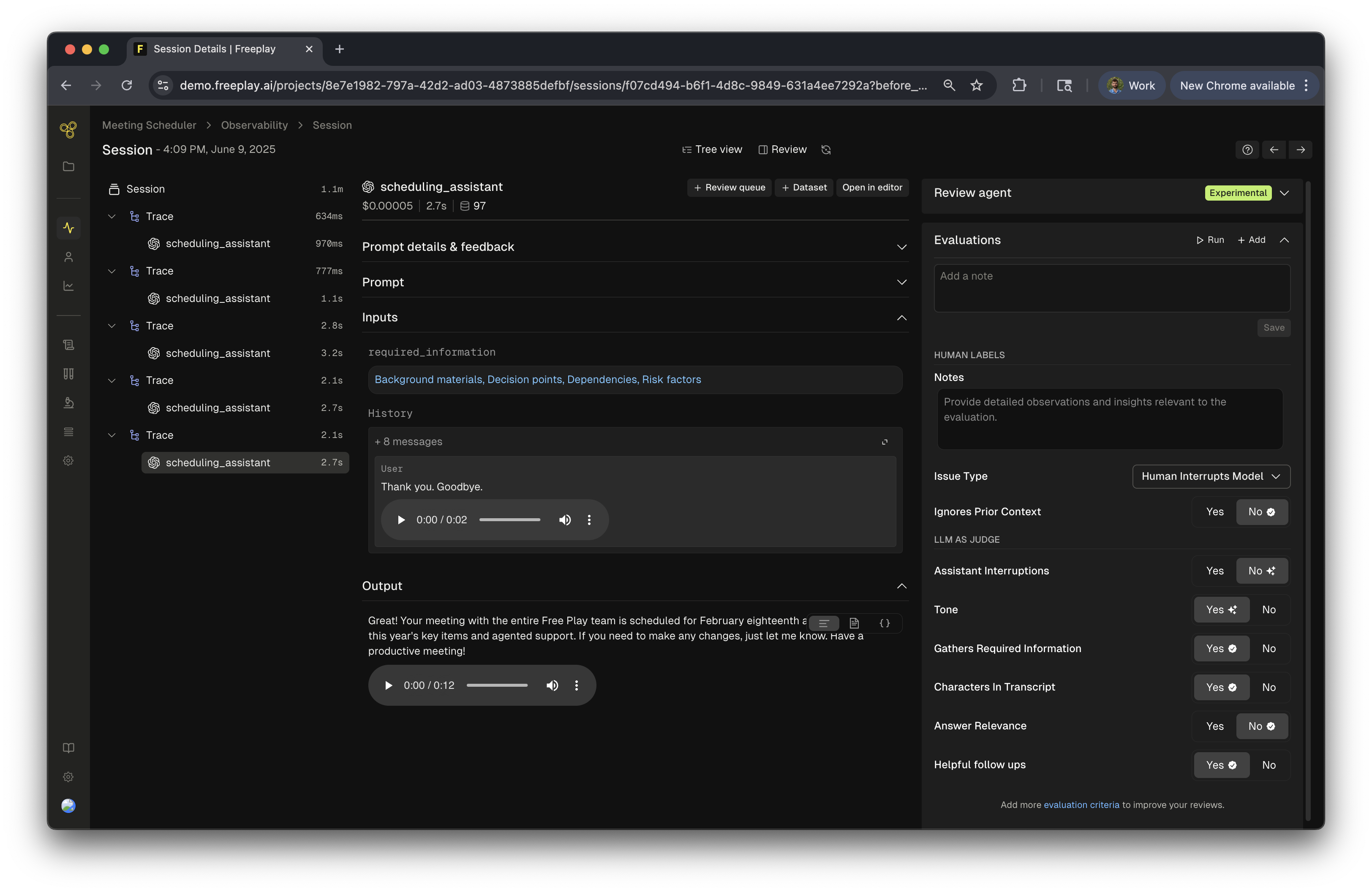 Once implemented, you'll be able to view complete user interactions in Freeplay, including:
* Audio recordings
* Transcribed text
* LLM responses
* Cost & latency metrics
* Evaluation results
## Integration Approaches
Freeplay provides seamless integration with Pipecat to log audio interactions and LLM responses for comprehensive testing and evaluation of your voice agents.
### Option 1: Processor Integration
* How it works: Directly intercepts frames within the pipeline processing flow
* Trade-off: Adds minimal latency as processing happens inline
* Best for: Cases where you need direct frame manipulation or synchronous processing
* Documentation: [Pipecat Processors](https://pipecat-docs.readthedocs.io/en/latest/api/pipecat.processors.html)
* Full Example: [FreeplayProcessor](/developer-resources/recipes/pipecat-processor-integration)
### Option 2: Observer Integration ⭐ Recommended
* How it works: Uses callbacks to log data asynchronously in the background
* Trade-off: Zero impact on pipeline latency since logging happens outside the main flow
* Best for: Voice agents where low latency is critical
* Documentation: [Pipecat Observer Pattern](https://docs.pipecat.ai/server/utilities/observers/observer-pattern)
* Full Example: [FreeplayObserver](/developer-resources/recipes/freeplay-pipecat-observer)
We recommend the Observer pattern: Since latency is crucial for voice agents, the Observer approach ensures your audio pipeline runs at maximum speed while still capturing all necessary data for Freeplay.
## Conversation Flow in a Pipecat + Twilio + Freeplay Integration
Once implemented, you'll be able to view complete user interactions in Freeplay, including:
* Audio recordings
* Transcribed text
* LLM responses
* Cost & latency metrics
* Evaluation results
## Integration Approaches
Freeplay provides seamless integration with Pipecat to log audio interactions and LLM responses for comprehensive testing and evaluation of your voice agents.
### Option 1: Processor Integration
* How it works: Directly intercepts frames within the pipeline processing flow
* Trade-off: Adds minimal latency as processing happens inline
* Best for: Cases where you need direct frame manipulation or synchronous processing
* Documentation: [Pipecat Processors](https://pipecat-docs.readthedocs.io/en/latest/api/pipecat.processors.html)
* Full Example: [FreeplayProcessor](/developer-resources/recipes/pipecat-processor-integration)
### Option 2: Observer Integration ⭐ Recommended
* How it works: Uses callbacks to log data asynchronously in the background
* Trade-off: Zero impact on pipeline latency since logging happens outside the main flow
* Best for: Voice agents where low latency is critical
* Documentation: [Pipecat Observer Pattern](https://docs.pipecat.ai/server/utilities/observers/observer-pattern)
* Full Example: [FreeplayObserver](/developer-resources/recipes/freeplay-pipecat-observer)
We recommend the Observer pattern: Since latency is crucial for voice agents, the Observer approach ensures your audio pipeline runs at maximum speed while still capturing all necessary data for Freeplay.
## Conversation Flow in a Pipecat + Twilio + Freeplay Integration
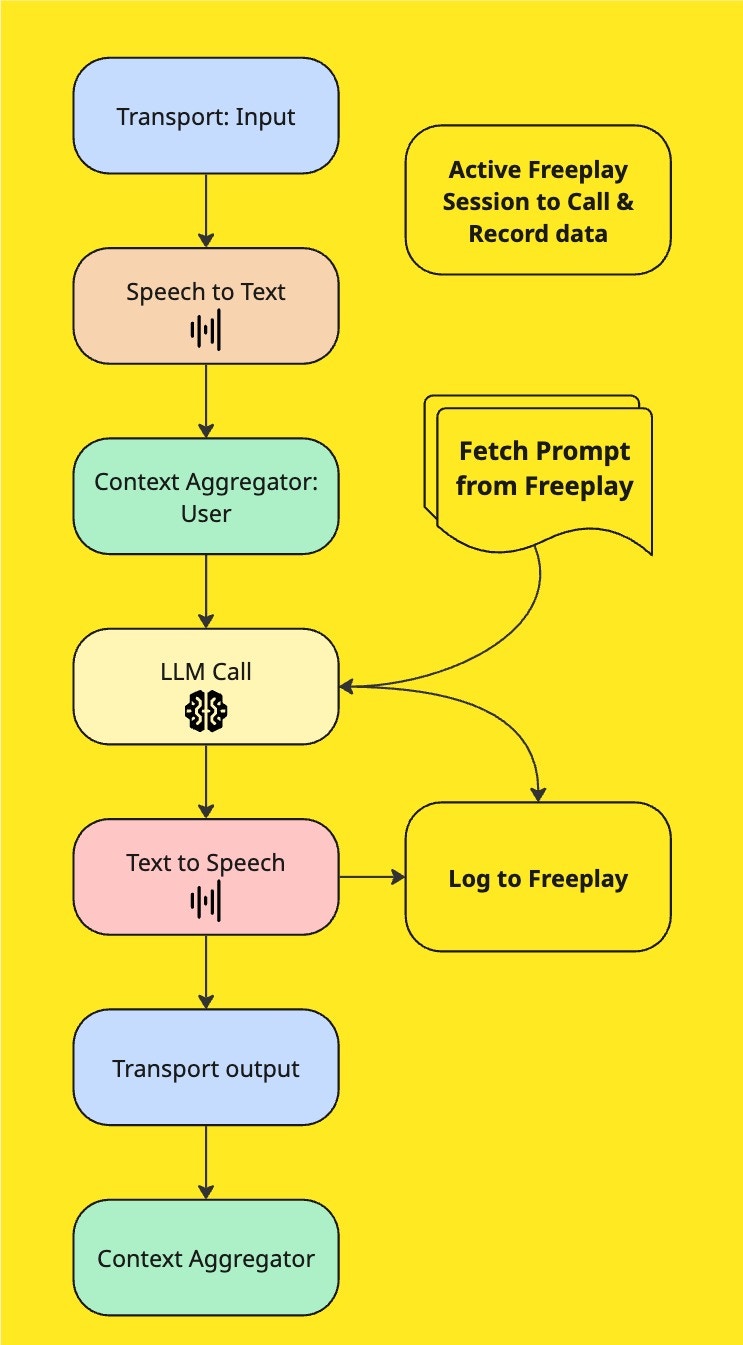 The above image shows how Freeplay integrates into the pipeline. Regardless if you are using the Observer or Processor methods, the logic is very similar. Once both user and bot audio is received and complete, a turn can be logged to Freeplay. This flow ensures comprehensive logging while maintaining optimal performance for real-time voice interactions.
***
## Implementation Guide FreeplayObserver
### Pro Tip: AudioBufferProcessor
We highly recommend using Pipecat's [AudioBufferProcessor](https://pipecat-docs.readthedocs.io/en/latest/api/pipecat.processors.audio.audio_buffer_processor.html) alongside the FreeplayObserver. This well-tested utility:
* Formats audio data consistently for logging
* Provides reliable callbacks for conversation turn detection
* Simplifies audio handling and storage
This implementation guide uses the [Twilio-Chatbot](https://github.com/pipecat-ai/pipecat/tree/main/examples/twilio-chatbot) example provided by Pipecat—a chatbot accessed via phone application powered by Twilio. This integration allows you to log audio interactions and LLM responses to Freeplay for comprehensive testing and evaluation of your audio agents.
### Prerequisites
Before starting, make sure you have:
1. A Freeplay account set up (follow our [quick start guide](/getting-started))
2. Your prompts configured in Freeplay (follow our [prompting guide](/core-concepts/prompt-management/managing-prompts))
3. A working Pipecat + Twilio application
For a complete code example, see our FreeplayObserver Pipecat [Recipe](/developer-resources/recipes/freeplay-pipecat-observer).
### Step 1: Import Prompt Configuration from Freeplay
First, fetch your prompt configuration from Freeplay and prepare it for use in your Pipecat pipeline:
```python python theme={null}
from helpers.freeplay_frame import FreeplayProcessor # Processor example
from helpers.freeplay_observer import FreeplayObserver # Observer example
from freeplay import Freeplay, SessionInfo
# Freeplay Client
fp_client = Freeplay(
freeplay_api_key=os.getenv("FREEPLAY_API_KEY"),
api_base=os.getenv("FREEPLAY_API_BASE")
)
# Get the unformatted prompt from Freeplay
unformatted_prompt = fp_client.prompts.get(
project_id=os.getenv("FREEPLAY_PROJECT_ID"),
template_name=os.getenv("PROMPT_NAME"),
environment="latest",
)
formatted_prompt = unformatted_prompt.bind(
variables=,
history=[],
).format()
# Pass the formatted prompt to the LLM
llm = OpenAILLMService(model=formatted_prompt.prompt_info.model,
tools=formatted_prompt.tool_schema if formatted_prompt.tool_schema else None,
api_key=os.getenv("OPENAI_API_KEY"),
**formatted_prompt.prompt_info.model_parameters)
```
*Why bind the prompt? This approach allows you to fetch the prompt once and reuse it throughout the conversation, avoiding repeated API calls to Freeplay while still allowing you to add new variables and information at each conversation turn.*
### Step 2: Create Your Freeplay Observer
Create a FreeplayObserver to handle conversation memory, frame monitoring, and data logging. See the full code [here](/developer-resources/recipes/freeplay-pipecat-observer).
```python python theme={null}
# Note: see the full implementation in our Recipe section of the docs.
class FreeplayObserver(BaseObserver):
def __init__(
self,
fp_client: Freeplay,
unformatted_prompt: str = None,
template_name: str = os.getenv("PROMPT_NAME") or None,
environment: str = "latest",
variables: dict = {},
):
super().__init__()
self.start_llm_interaction = 0
self.end_llm_interaction = 0
self.llm_completion_latency = 0
self.call_id = str(uuid.uuid4()) # Has to be str to record to Freeplay
# Audio related properties
self.sample_width = 2
self.num_channels = 1
self.sample_rate = 16000
self._bot_audio = bytearray()
self._user_audio = bytearray()
self._turn_user_audio = bytearray()
self.user_speaking = False
self.bot_speaking = False
self.fp_client = fp_client
self.session = self.fp_client.sessions.create()
# Freeplay Params
self.template_name = template_name
self.environment = environment
self.unformatted_prompt = unformatted_prompt
self.variables = variables
# Conversation Params
self.conversation_id = self._new_conv_id()
self.conversation_history = []
self.most_recent_user_message = None
self.most_recent_completion = None
def _new_conv_id(self) -> str:
"""Generate a new conversation ID based on the current timestamp (this represents a customer id or similar)."""
return datetime.datetime.now().strftime("%Y%m%d_%H%M%S")
def _reset_recent_messages(self):
"""Reset all temporary message and audio storage."""
self.most_recent_user_message = None
self.most_recent_completion = None
self._user_audio = bytearray()
self._bot_audio = bytearray()
self._turn_user_audio = bytearray()
# self.llm_completion_latency = 0
async def record_to_freeplay(self):
"""Record the current interaction to Freeplay as a new trace."""
# Create a new trace for this interaction
trace = self.session.create_trace(
input=self.most_recent_user_message,
custom_metadata={
"conversation_id": str(self.conversation_id),
},
)
# Add user message to conversation history
self.conversation_history.append(
{
"role": "user",
"content": [
{"type": "text", "text": self.most_recent_user_message},
{
"type": "input_audio",
"input_audio": {
"data": base64.b64encode(self._user_audio).decode("utf-8"),
"format": "wav",
},
},
],
},
)
# Bind the variables to the prompt
if self.unformatted_prompt:
formatted = self.unformatted_prompt.bind(
variables=self.variables,
history=self.conversation_history,
).format()
else:
# Run in executor to avoid blocking
loop = asyncio.get_running_loop()
formatted = await loop.run_in_executor(
None,
self.fp_client.prompts.get_formatted,
project_id=os.getenv("FREEPLAY_PROJECT_ID"),
template_name=self.template_name,
environment=self.environment,
history=self.conversation_history,
variables=self.variables,
)
# Calculate latency for the LLM interaction
# Convert nanoseconds to seconds for proper timing
latency_seconds = self.get_llm_response_latency_seconds()
end = time.time()
start = end - latency_seconds
try:
print(f"_____* self._bot_audio: {len(self._bot_audio)}")
# Prepare metadata and record payload
custom_metadata = {"caller_id": self.call_id}
# Prepare assistants response message (mimicing the format of the llm provider message)
assistant_msg = {
"role": "assistant",
"content": [
{"type": "text", "text": self.most_recent_completion},
],
"audio": {
"id": self.conversation_id,
"data": base64.b64encode(self._bot_audio).decode("utf-8"),
"expires_at": 1729234747,
"transcript": self.most_recent_completion,
},
}
# Add assistant's response to conversation history
self.conversation_history.append(assistant_msg)
record = RecordPayload(
all_messages=[
*formatted.llm_prompt,
assistant_msg, # Add the assistant's response to the record call
],
session_info=SessionInfo(
self.session.session_id, custom_metadata=custom_metadata
),
inputs={},
prompt_info=formatted.prompt_info,
call_info=CallInfo.from_prompt_info(formatted.prompt_info, start, end),
trace_info=trace,
)
# Create recording in Freeplay
loop = asyncio.get_running_loop()
await loop.run_in_executor(None, self.fp_client.recordings.create, record)
# Record output to trace
await loop.run_in_executor(
None,
functools.partial(
trace.record_output,
project_id=os.getenv("FREEPLAY_PROJECT_ID"),
output=self.most_recent_completion,
eval_results={},
),
)
print(
f"✅ Recorded interaction #{len(self.conversation_history) // 2} to Freeplay - LLM response time: {self.get_llm_response_latency_seconds():.3f}s",
flush=True,
)
# Reset only audio and current message data, keep conversation history
self._reset_recent_messages()
except Exception as e:
print(f"❌ Error recording to Freeplay: {e}", flush=True)
# Still reset audio buffers to prevent accumulation
# audio buffers are overwritten in event handler
self._reset_recent_messages()
async def make_wav_bytes(
self, pcm: bytes, sample_rate: int, voice: str, prepend_silence_secs: int = 1
) -> bytes:
"""Convert PCM audio data to WAV format with optional silence prepend."""
if prepend_silence_secs > 0:
silence_samples = int(
self.sample_rate
* self.sample_width
* self.num_channels
* prepend_silence_secs
)
silence = b"\x00" * silence_samples
pcm = silence + pcm
with io.BytesIO() as buf:
with wave.open(buf, "wb") as wf:
wf.setnchannels(self.num_channels)
wf.setsampwidth(self.sample_width)
wf.setframerate(sample_rate)
wf.writeframes(pcm)
return buf.getvalue()
async def on_push_frame(self, data: FramePushed):
src = data.source
dst = data.destination
frame = data.frame
direction = data.direction
timestamp = data.timestamp
# Create direction arrow
arrow = "→" if direction == FrameDirection.DOWNSTREAM else "←"
if isinstance(frame, LLMFullResponseStartFrame):
print(f"LLMFullResponseFrame: START {src} {arrow} {dst}", flush=True)
elif isinstance(frame, LLMFullResponseEndFrame):
print(f"LLMFullResponseFrame: END {src} {arrow} {dst}", flush=True)
elif isinstance(frame, TranscriptionFrame):
# Capture user if bot talks first
if self.most_recent_user_message is None:
self.most_recent_user_message = frame.text
elif isinstance(frame, OpenAILLMContextFrame):
messages = frame.context.messages
# Extract user message and completion from context
# NOTE: this replaces the TranscriptionFrame results, as this maps excatly what the llm recived.
user_messages = [m for m in messages if m.get("role") == "user"]
if user_messages:
self.most_recent_user_message = user_messages[-1].get("content")
completions = [m for m in messages if m.get("role") == "assistant"]
if completions:
self.most_recent_completion = completions[-1].get("content")
# Get relevant latency metrics for the LLM interaction
if (
isinstance(frame, OpenAILLMContextFrame)
and isinstance(src, LLMUserContextAggregator)
and isinstance(dst, BaseOpenAILLMService)
):
self.start_llm_interaction = timestamp
print(f"_____freeplay-observer.py OpenAILLMContextFrame START: {timestamp}")
elif isinstance(frame, LLMFullResponseEndFrame) and isinstance(
src, BaseOpenAILLMService
):
self.end_llm_interaction = timestamp
# update latency tally
self.llm_completion_latency = (
self.end_llm_interaction - self.start_llm_interaction
)
print(
f"_____freeplay-observer.py * set self.llm_completion_latency: {self.llm_completion_latency} ({self.get_llm_response_latency_seconds():.3f}s)"
)
def get_llm_response_latency_seconds(self):
"""Convert the raw nanosecond LLM response latency to seconds."""
return self.llm_completion_latency / 1_000_000_000
```
### Step 3: Configure Your Pipeline with Audio Buffering
Set up your Pipecat pipeline with the FreeplayObserver and audio buffering capabilities:
```python python theme={null}
from pipecat.pipeline.task import PipelineTask
from pipecat.pipeline.pipeline import Pipeline
from pipecat.processors.audio.audio_buffer import AudioBufferProcessor
# Create audio buffer for capturing conversation audio
audiobuffer = AudioBufferProcessor(
sample_rate=8000,
num_channels=1,
)
# Configure pipeline task with observer
task = PipelineTask(
pipeline,
params=PipelineParams(
audio_in_sample_rate=8000,
audio_out_sample_rate=8000,
allow_interruptions=True,
enable_metrics=True,
enable_usage_metrics=True,
),
observers=[freeplay_observer], # Add observer here
)
```
### Step 4: Set Up Audio Capture Callbacks & Configure Pipeline
Configure callbacks to capture audio at the optimal moments:
```python python theme={null}
from helpers.freeplay_observer import FreeplayObserver # Observer example
freeplay_observer = FreeplayObserver(
fp_client=fp_client,
unformatted_prompt=unformatted_prompt,
environment=os.getenv("FREEPLAY_ENVIRONMENT"),
)
#....Additional Pipeline Configuration...
task = PipelineTask(
pipeline,
params=PipelineParams(
audio_in_sample_rate=8000,
audio_out_sample_rate=8000,
allow_interruptions=True,
enable_metrics=True,
enable_usage_metrics=True, # This is used to track the usage of the LLM
),
observers=[
freeplay_observer
], # Use the FreeplayObserver to record the audio to Freeplay
)
# save audio bytes from user and store in freeplay_observer
@audiobuffer.event_handler("on_user_turn_audio_data")
async def on_user_turn_audio_data(buffer, audio, sample_rate, num_channels):
if audio and not freeplay_observer._bot_audio:
# aggregate user audio because this event could fire multiple times
# before bot responds
freeplay_observer._user_audio = freeplay_observer._turn_user_audio.extend(
audio
)
freeplay_observer._user_audio = await freeplay_observer.make_wav_bytes(
freeplay_observer._turn_user_audio,
sample_rate,
"user",
prepend_silence_secs=1,
)
elif audio and freeplay_observer._bot_audio:
freeplay_observer._user_audio = freeplay_observer._turn_user_audio.extend(
audio
)
freeplay_observer._user_audio = await freeplay_observer.make_wav_bytes(
freeplay_observer._turn_user_audio,
sample_rate,
"user",
prepend_silence_secs=1,
)
await freeplay_observer.record_to_freeplay()
# save audio bytes from bot and store in freeplay_observer
@audiobuffer.event_handler("on_bot_turn_audio_data")
async def on_bot_turn_audio_data(buffer, audio, sample_rate, num_channels):
# this assumes the user always speaks first and would cut off
# the first turn of the bot
if audio and not freeplay_observer._user_audio:
# aggregate bot audio because this event could fire multiple times
# before user responds
freeplay_observer._bot_audio = await freeplay_observer.make_wav_bytes(
audio, sample_rate, "bot", prepend_silence_secs=1
)
elif audio and freeplay_observer._user_audio:
freeplay_observer._bot_audio = await freeplay_observer.make_wav_bytes(
audio, sample_rate, "bot", prepend_silence_secs=1
)
await freeplay_observer.record_to_freeplay()
```
1. Add the `FreeplayObserver` to Your Pipeline
2. Initialize at Conversation Level The FreeplayObserver must be initialized at the conversation level to properly track the entire interaction flow.
3. Automatic Frame Processing As audio frames pass through the observer's on\_push\_frame method, it automatically updates the processor variables with both user and bot audio data and metadata.
4. Recording with AudioBufferProcessor Callbacks To determine the optimal timing for recording to Freeplay, we recommend using AudioBufferProcessor callbacks:
1. `on_bot_turn_audio_data` - Captures when the bot completes its audio response
2. `on_user_turn_audio_data` - Captures when the user finishes speaking
These callbacks provide the most reliable trigger points for logging complete conversation turns.
## Alternative: FreeplayProcessor Integration
### Step 1: Import Your Prompt from Freeplay & Pass to the LLMProcessor
*Note, here we get an unformatted prompt from Freeplay and then bind it, this allows us to pass it to the system and not have to make repeated calls to retrieve the llm prompt from Freeplay. The binding allows us to add new variables and information at each turn of the conversation. You can see more[here](/freeplay-sdk#get-a-prompt-template).*
```python python theme={null}
from helpers.freeplay_frame import FreeplayProcessor # Processor example
from helpers.freeplay_observer import FreeplayObserver # Observer example
from freeplay import Freeplay, SessionInfo
# Freeplay Client
fp_client = Freeplay(
freeplay_api_key=os.getenv("FREEPLAY_API_KEY"),
api_base=os.getenv("FREEPLAY_API_BASE")
)
# Get the unformatted prompt from Freeplay
unformatted_prompt = fp_client.prompts.get(
project_id=os.getenv("FREEPLAY_PROJECT_ID"),
template_name=os.getenv("PROMPT_NAME"),
environment="latest",
)
formatted_prompt = unformatted_prompt.bind(
variables=,
history=[],
).format()
# Pass the formatted prompt to the LLM
llm = OpenAILLMService(model=formatted_prompt.prompt_info.model,
tools=formatted_prompt.tool_schema if formatted_prompt.tool_schema else None,
api_key=os.getenv("OPENAI_API_KEY"),
**formatted_prompt.prompt_info.model_parameters)
```
### Step 2: Create a Freeplay Processor
The processor handles the memory of the conversation, processing of key frames, and and keeps track of information to log to Freeplay. This inherits from `FrameProcessor` in Pipecat. See the full code implementation [here](/developer-resources/recipes/pipecat-processor-integration).
```python python theme={null}
class FreeplayProcessor(FrameProcessor):
"""Logs LLM interactions and audio to Freeplay with simplified structure."""
def __init__(
self,
fp_client: Freeplay,
template_name: str,
session: SessionInfo = None,
required_information: str = None,
unformatted_prompt: PromptInfo = None,
):
super().__init__()
self.fp_client = fp_client
self.template_name = template_name
self.conversation_id = self._new_conv_id()
self.total_completion_time = 0
self.required_information = required_information
self.deepgram_latency = 0
# Audio related properties
self.sample_width = 2
self.sample_rate = 8000
self.num_channels = 1
self._user_audio = bytearray()
self._bot_audio = bytearray()
self.user_speaking = False
self.bot_speaking = False
# Freeplay related properties
self.conversation_history = []
self.session = session
self.most_recent_user_message = None
self.most_recent_completion = None
self.unformatted_prompt = unformatted_prompt
self.reset_recent_messages()
def _new_conv_id(self) -> str:
"""Generate a new conversation ID based on the current timestamp (this represents a customer id or similar)."""
return datetime.datetime.now().strftime("%Y%m%d_%H%M%S")
def reset_recent_messages(self):
"""Reset all temporary message and audio storage."""
self.most_recent_user_message = None
self.most_recent_completion = None
self._user_audio = bytearray()
self._bot_audio = bytearray()
self.total_completion_time = 0
self.deepgram_latency = 0
async def process_frame(self, frame: Frame, direction: FrameDirection):
"""Process incoming frames and handle Freeplay logging."""
await super().process_frame(frame, direction)
# Handle LLM response frames
if isinstance(frame, (LLMFullResponseStartFrame, LLMFullResponseEndFrame)):
event = "START" if isinstance(frame, LLMFullResponseStartFrame) else "END"
print(f"LLMFullResponseFrame: {event}", flush=True)
# Handle LLM context frame - this is where we log to Freeplay
elif isinstance(frame, OpenAILLMContextFrame):
messages = frame.context.messages
# Extract user message and completion from context
user_messages = [m for m in messages if m.get("role") == "user"]
if user_messages:
self.most_recent_user_message = user_messages[-1].get("content")
completions = [m for m in messages if m.get("role") == "assistant"]
if completions:
self.most_recent_completion = completions[-1].get("content")
# Log to Freeplay when we have both user input and completion
if self.most_recent_user_message and self.most_recent_completion:
self._record_to_freeplay()
# Handle audio state changes
elif isinstance(frame, UserStartedSpeakingFrame):
self.user_speaking = True
elif isinstance(frame, UserStoppedSpeakingFrame):
self.user_speaking = False
elif isinstance(frame, BotStartedSpeakingFrame):
self.bot_speaking = True
elif isinstance(frame, BotStoppedSpeakingFrame):
self.bot_speaking = False
# # Handle audio data
elif isinstance(frame, InputAudioRawFrame):
if self.user_speaking:
self._user_audio.extend(frame.audio)
elif isinstance(frame, TTSAudioRawFrame):
if self.bot_speaking:
self._bot_audio.extend(frame.audio)
# Handle metrics for LLM completion time
elif isinstance(frame, MetricsFrame):
self.metrics = frame.data
for metric in frame.data:
if isinstance(metric, ProcessingMetricsData):
if "LLMService" in metric.processor:
self.total_completion_time = metric.value
elif isinstance(metric, TTFBMetricsData):
if "DeepgramSTTService" in metric.processor:
self.deepgram_latency += metric.value
# Pass frame to next processor
await self.push_frame(frame, direction)
```
***
Note: It is required to modify the `processes_frame` function in pipecat’s `base_llm.py` to pass along the OpenAILLMContext frame, this makes the handling easier in the FreeplayLLMLogger - `process_frame`:
```python python theme={null}
async def process_frame(self, frame: Frame, direction: FrameDirection):
await super().process_frame(frame, direction)
context = None
if isinstance(frame, OpenAILLMContextFrame):
context: OpenAILLMContext = frame.context
await self.push_frame(frame, direction) # Add this line here to pass frame along
elif isinstance(frame, LLMMessagesFrame):
context = OpenAILLMContext.from_messages(frame.messages)
elif isinstance(frame, VisionImageRawFrame):
context = OpenAILLMContext()
context.add_image_frame_message(
format=frame.format, size=frame.size, image=frame.image, text=frame.text
)
elif isinstance(frame, LLMUpdateSettingsFrame):
await self._update_settings(frame.settings)
else:
await self.push_frame(frame, direction)
....
```
***
### Step 3: Add the FreeplayProcessor To Your Pipeline
Initialize your `FreeplayProcessor` and add it as a step in your pipeline. It is recommended that you add this after the `STT` or the `audioBuffer` steps in your pipeline so that all of the information needed is available when you log to Freeplay.
```python python theme={null}
# Pass the Freeplay client to the FreeplayProcessor
freeplay_processor = FreeplayProcessor(
fp_client=fp_client,
template_name="voice-assistant",
session=session,
debug=True
)
#....Additional Pipeline Configuration...
pipeline = Pipeline(
[
transport.input(), # Websocket input from client
stt, # Speech-To-Text
context_aggregator.user(),
llm, # LLM
tts, # Text-To-Speech
freeplay_processor, # Freeplay Logger (after tts so it can capture assistant audio)
transport.output(), # Websocket output to client
audiobuffer, # Used to buffer the audio in the pipeline
context_aggregator.assistant(),
]
)
```
### Step 4: Start logging completions
Begin capturing real user interactions in Freeplay, this is a function of the FreeplayProcessor. The audio is being added to the conversation history for proper tracking.
```python python theme={null}
def _record_to_freeplay(self):
"""Record the current conversation state to Freeplay."""
# Create a new trace for this interaction
trace = self.session.create_trace(
input=self.most_recent_user_message,
custom_metadata={
"deepgram_latency": self.deepgram_latency,
},
)
self.conversation_history.append(
{
"role": "user",
"content": [
{"type": "text", "text": self.most_recent_user_message},
{
"type": "input_audio",
"input_audio": {
"data": base64.b64encode(
self._make_wav_bytes(
self._user_audio, prepend_silence_secs=1
)
).decode("utf-8"),
"format": "wav",
},
},
],
},
)
# Bind the variables to the prompt
if self.unformatted_prompt:
formatted = self.unformatted_prompt.bind(
variables={"required_information": self.required_information},
history=self.conversation_history,
).format()
else:
# Get formatted prompt. Note this adds latency to the pipeline
formatted = self.fp_client.prompts.get_formatted(
project_id=os.getenv("FREEPLAY_PROJECT_ID"),
template_name=self.template_name,
environment="latest",
history=self.conversation_history,
variables={"required_information": self.required_information},
)
# Calculate latency for the LLM interaction
start, end = time.time(), time.time() + self.total_completion_time
try:
# Prepare metadata and record payload
custom_metadata = {
"conversation_id": str(self.conversation_id),
}
# Add assistant's response to conversation history
last_message = {
"role": "assistant",
"content": [
{"type": "text", "text": self.most_recent_completion},
],
"audio": {
"id": self.conversation_id,
"data": base64.b64encode(
self._make_wav_bytes(self._bot_audio, prepend_silence_secs=1)
).decode("utf-8"),
"expires_at": 1729234747,
"transcript": self.most_recent_completion,
},
}
self.conversation_history.append(last_message)
# Create recording in Freeplay
self.fp_client.recordings.create(
RecordPayload(
project_id=os.get("FP_PROJECT_ID")
all_messages=[
*formatted.llm_prompt,
last_message, # Add the last message to the record call
],
session_info=SessionInfo(
self.session.session_id, custom_metadata=custom_metadata
),
inputs={"required_information": self.required_information},
prompt_version_info=formatted.prompt_info,
call_info=CallInfo.from_prompt_info(
formatted.prompt_info, start, end
),
trace_info=trace,
)
)
# Record output to trace
trace.record_output(
os.getenv("FREEPLAY_PROJECT_ID"),
self.most_recent_completion,
)
print(
f"Successfully recorded to Freeplay - completion time: {self.total_completion_time}s",
flush=True,
)
self.reset_recent_messages()
except Exception as e:
print(f"Error recording to Freeplay: {e}", flush=True)
self.reset_recent_messages()
```
### Helpful resources:
[Configure LiteLLM Proxy Models in Freeplay](/account-setup/configure-litellm-proxy-models-in-freeplay)
[Security Overview](/security-compliance/security-overview)
```
```
The above image shows how Freeplay integrates into the pipeline. Regardless if you are using the Observer or Processor methods, the logic is very similar. Once both user and bot audio is received and complete, a turn can be logged to Freeplay. This flow ensures comprehensive logging while maintaining optimal performance for real-time voice interactions.
***
## Implementation Guide FreeplayObserver
### Pro Tip: AudioBufferProcessor
We highly recommend using Pipecat's [AudioBufferProcessor](https://pipecat-docs.readthedocs.io/en/latest/api/pipecat.processors.audio.audio_buffer_processor.html) alongside the FreeplayObserver. This well-tested utility:
* Formats audio data consistently for logging
* Provides reliable callbacks for conversation turn detection
* Simplifies audio handling and storage
This implementation guide uses the [Twilio-Chatbot](https://github.com/pipecat-ai/pipecat/tree/main/examples/twilio-chatbot) example provided by Pipecat—a chatbot accessed via phone application powered by Twilio. This integration allows you to log audio interactions and LLM responses to Freeplay for comprehensive testing and evaluation of your audio agents.
### Prerequisites
Before starting, make sure you have:
1. A Freeplay account set up (follow our [quick start guide](/getting-started))
2. Your prompts configured in Freeplay (follow our [prompting guide](/core-concepts/prompt-management/managing-prompts))
3. A working Pipecat + Twilio application
For a complete code example, see our FreeplayObserver Pipecat [Recipe](/developer-resources/recipes/freeplay-pipecat-observer).
### Step 1: Import Prompt Configuration from Freeplay
First, fetch your prompt configuration from Freeplay and prepare it for use in your Pipecat pipeline:
```python python theme={null}
from helpers.freeplay_frame import FreeplayProcessor # Processor example
from helpers.freeplay_observer import FreeplayObserver # Observer example
from freeplay import Freeplay, SessionInfo
# Freeplay Client
fp_client = Freeplay(
freeplay_api_key=os.getenv("FREEPLAY_API_KEY"),
api_base=os.getenv("FREEPLAY_API_BASE")
)
# Get the unformatted prompt from Freeplay
unformatted_prompt = fp_client.prompts.get(
project_id=os.getenv("FREEPLAY_PROJECT_ID"),
template_name=os.getenv("PROMPT_NAME"),
environment="latest",
)
formatted_prompt = unformatted_prompt.bind(
variables=,
history=[],
).format()
# Pass the formatted prompt to the LLM
llm = OpenAILLMService(model=formatted_prompt.prompt_info.model,
tools=formatted_prompt.tool_schema if formatted_prompt.tool_schema else None,
api_key=os.getenv("OPENAI_API_KEY"),
**formatted_prompt.prompt_info.model_parameters)
```
*Why bind the prompt? This approach allows you to fetch the prompt once and reuse it throughout the conversation, avoiding repeated API calls to Freeplay while still allowing you to add new variables and information at each conversation turn.*
### Step 2: Create Your Freeplay Observer
Create a FreeplayObserver to handle conversation memory, frame monitoring, and data logging. See the full code [here](/developer-resources/recipes/freeplay-pipecat-observer).
```python python theme={null}
# Note: see the full implementation in our Recipe section of the docs.
class FreeplayObserver(BaseObserver):
def __init__(
self,
fp_client: Freeplay,
unformatted_prompt: str = None,
template_name: str = os.getenv("PROMPT_NAME") or None,
environment: str = "latest",
variables: dict = {},
):
super().__init__()
self.start_llm_interaction = 0
self.end_llm_interaction = 0
self.llm_completion_latency = 0
self.call_id = str(uuid.uuid4()) # Has to be str to record to Freeplay
# Audio related properties
self.sample_width = 2
self.num_channels = 1
self.sample_rate = 16000
self._bot_audio = bytearray()
self._user_audio = bytearray()
self._turn_user_audio = bytearray()
self.user_speaking = False
self.bot_speaking = False
self.fp_client = fp_client
self.session = self.fp_client.sessions.create()
# Freeplay Params
self.template_name = template_name
self.environment = environment
self.unformatted_prompt = unformatted_prompt
self.variables = variables
# Conversation Params
self.conversation_id = self._new_conv_id()
self.conversation_history = []
self.most_recent_user_message = None
self.most_recent_completion = None
def _new_conv_id(self) -> str:
"""Generate a new conversation ID based on the current timestamp (this represents a customer id or similar)."""
return datetime.datetime.now().strftime("%Y%m%d_%H%M%S")
def _reset_recent_messages(self):
"""Reset all temporary message and audio storage."""
self.most_recent_user_message = None
self.most_recent_completion = None
self._user_audio = bytearray()
self._bot_audio = bytearray()
self._turn_user_audio = bytearray()
# self.llm_completion_latency = 0
async def record_to_freeplay(self):
"""Record the current interaction to Freeplay as a new trace."""
# Create a new trace for this interaction
trace = self.session.create_trace(
input=self.most_recent_user_message,
custom_metadata={
"conversation_id": str(self.conversation_id),
},
)
# Add user message to conversation history
self.conversation_history.append(
{
"role": "user",
"content": [
{"type": "text", "text": self.most_recent_user_message},
{
"type": "input_audio",
"input_audio": {
"data": base64.b64encode(self._user_audio).decode("utf-8"),
"format": "wav",
},
},
],
},
)
# Bind the variables to the prompt
if self.unformatted_prompt:
formatted = self.unformatted_prompt.bind(
variables=self.variables,
history=self.conversation_history,
).format()
else:
# Run in executor to avoid blocking
loop = asyncio.get_running_loop()
formatted = await loop.run_in_executor(
None,
self.fp_client.prompts.get_formatted,
project_id=os.getenv("FREEPLAY_PROJECT_ID"),
template_name=self.template_name,
environment=self.environment,
history=self.conversation_history,
variables=self.variables,
)
# Calculate latency for the LLM interaction
# Convert nanoseconds to seconds for proper timing
latency_seconds = self.get_llm_response_latency_seconds()
end = time.time()
start = end - latency_seconds
try:
print(f"_____* self._bot_audio: {len(self._bot_audio)}")
# Prepare metadata and record payload
custom_metadata = {"caller_id": self.call_id}
# Prepare assistants response message (mimicing the format of the llm provider message)
assistant_msg = {
"role": "assistant",
"content": [
{"type": "text", "text": self.most_recent_completion},
],
"audio": {
"id": self.conversation_id,
"data": base64.b64encode(self._bot_audio).decode("utf-8"),
"expires_at": 1729234747,
"transcript": self.most_recent_completion,
},
}
# Add assistant's response to conversation history
self.conversation_history.append(assistant_msg)
record = RecordPayload(
all_messages=[
*formatted.llm_prompt,
assistant_msg, # Add the assistant's response to the record call
],
session_info=SessionInfo(
self.session.session_id, custom_metadata=custom_metadata
),
inputs={},
prompt_info=formatted.prompt_info,
call_info=CallInfo.from_prompt_info(formatted.prompt_info, start, end),
trace_info=trace,
)
# Create recording in Freeplay
loop = asyncio.get_running_loop()
await loop.run_in_executor(None, self.fp_client.recordings.create, record)
# Record output to trace
await loop.run_in_executor(
None,
functools.partial(
trace.record_output,
project_id=os.getenv("FREEPLAY_PROJECT_ID"),
output=self.most_recent_completion,
eval_results={},
),
)
print(
f"✅ Recorded interaction #{len(self.conversation_history) // 2} to Freeplay - LLM response time: {self.get_llm_response_latency_seconds():.3f}s",
flush=True,
)
# Reset only audio and current message data, keep conversation history
self._reset_recent_messages()
except Exception as e:
print(f"❌ Error recording to Freeplay: {e}", flush=True)
# Still reset audio buffers to prevent accumulation
# audio buffers are overwritten in event handler
self._reset_recent_messages()
async def make_wav_bytes(
self, pcm: bytes, sample_rate: int, voice: str, prepend_silence_secs: int = 1
) -> bytes:
"""Convert PCM audio data to WAV format with optional silence prepend."""
if prepend_silence_secs > 0:
silence_samples = int(
self.sample_rate
* self.sample_width
* self.num_channels
* prepend_silence_secs
)
silence = b"\x00" * silence_samples
pcm = silence + pcm
with io.BytesIO() as buf:
with wave.open(buf, "wb") as wf:
wf.setnchannels(self.num_channels)
wf.setsampwidth(self.sample_width)
wf.setframerate(sample_rate)
wf.writeframes(pcm)
return buf.getvalue()
async def on_push_frame(self, data: FramePushed):
src = data.source
dst = data.destination
frame = data.frame
direction = data.direction
timestamp = data.timestamp
# Create direction arrow
arrow = "→" if direction == FrameDirection.DOWNSTREAM else "←"
if isinstance(frame, LLMFullResponseStartFrame):
print(f"LLMFullResponseFrame: START {src} {arrow} {dst}", flush=True)
elif isinstance(frame, LLMFullResponseEndFrame):
print(f"LLMFullResponseFrame: END {src} {arrow} {dst}", flush=True)
elif isinstance(frame, TranscriptionFrame):
# Capture user if bot talks first
if self.most_recent_user_message is None:
self.most_recent_user_message = frame.text
elif isinstance(frame, OpenAILLMContextFrame):
messages = frame.context.messages
# Extract user message and completion from context
# NOTE: this replaces the TranscriptionFrame results, as this maps excatly what the llm recived.
user_messages = [m for m in messages if m.get("role") == "user"]
if user_messages:
self.most_recent_user_message = user_messages[-1].get("content")
completions = [m for m in messages if m.get("role") == "assistant"]
if completions:
self.most_recent_completion = completions[-1].get("content")
# Get relevant latency metrics for the LLM interaction
if (
isinstance(frame, OpenAILLMContextFrame)
and isinstance(src, LLMUserContextAggregator)
and isinstance(dst, BaseOpenAILLMService)
):
self.start_llm_interaction = timestamp
print(f"_____freeplay-observer.py OpenAILLMContextFrame START: {timestamp}")
elif isinstance(frame, LLMFullResponseEndFrame) and isinstance(
src, BaseOpenAILLMService
):
self.end_llm_interaction = timestamp
# update latency tally
self.llm_completion_latency = (
self.end_llm_interaction - self.start_llm_interaction
)
print(
f"_____freeplay-observer.py * set self.llm_completion_latency: {self.llm_completion_latency} ({self.get_llm_response_latency_seconds():.3f}s)"
)
def get_llm_response_latency_seconds(self):
"""Convert the raw nanosecond LLM response latency to seconds."""
return self.llm_completion_latency / 1_000_000_000
```
### Step 3: Configure Your Pipeline with Audio Buffering
Set up your Pipecat pipeline with the FreeplayObserver and audio buffering capabilities:
```python python theme={null}
from pipecat.pipeline.task import PipelineTask
from pipecat.pipeline.pipeline import Pipeline
from pipecat.processors.audio.audio_buffer import AudioBufferProcessor
# Create audio buffer for capturing conversation audio
audiobuffer = AudioBufferProcessor(
sample_rate=8000,
num_channels=1,
)
# Configure pipeline task with observer
task = PipelineTask(
pipeline,
params=PipelineParams(
audio_in_sample_rate=8000,
audio_out_sample_rate=8000,
allow_interruptions=True,
enable_metrics=True,
enable_usage_metrics=True,
),
observers=[freeplay_observer], # Add observer here
)
```
### Step 4: Set Up Audio Capture Callbacks & Configure Pipeline
Configure callbacks to capture audio at the optimal moments:
```python python theme={null}
from helpers.freeplay_observer import FreeplayObserver # Observer example
freeplay_observer = FreeplayObserver(
fp_client=fp_client,
unformatted_prompt=unformatted_prompt,
environment=os.getenv("FREEPLAY_ENVIRONMENT"),
)
#....Additional Pipeline Configuration...
task = PipelineTask(
pipeline,
params=PipelineParams(
audio_in_sample_rate=8000,
audio_out_sample_rate=8000,
allow_interruptions=True,
enable_metrics=True,
enable_usage_metrics=True, # This is used to track the usage of the LLM
),
observers=[
freeplay_observer
], # Use the FreeplayObserver to record the audio to Freeplay
)
# save audio bytes from user and store in freeplay_observer
@audiobuffer.event_handler("on_user_turn_audio_data")
async def on_user_turn_audio_data(buffer, audio, sample_rate, num_channels):
if audio and not freeplay_observer._bot_audio:
# aggregate user audio because this event could fire multiple times
# before bot responds
freeplay_observer._user_audio = freeplay_observer._turn_user_audio.extend(
audio
)
freeplay_observer._user_audio = await freeplay_observer.make_wav_bytes(
freeplay_observer._turn_user_audio,
sample_rate,
"user",
prepend_silence_secs=1,
)
elif audio and freeplay_observer._bot_audio:
freeplay_observer._user_audio = freeplay_observer._turn_user_audio.extend(
audio
)
freeplay_observer._user_audio = await freeplay_observer.make_wav_bytes(
freeplay_observer._turn_user_audio,
sample_rate,
"user",
prepend_silence_secs=1,
)
await freeplay_observer.record_to_freeplay()
# save audio bytes from bot and store in freeplay_observer
@audiobuffer.event_handler("on_bot_turn_audio_data")
async def on_bot_turn_audio_data(buffer, audio, sample_rate, num_channels):
# this assumes the user always speaks first and would cut off
# the first turn of the bot
if audio and not freeplay_observer._user_audio:
# aggregate bot audio because this event could fire multiple times
# before user responds
freeplay_observer._bot_audio = await freeplay_observer.make_wav_bytes(
audio, sample_rate, "bot", prepend_silence_secs=1
)
elif audio and freeplay_observer._user_audio:
freeplay_observer._bot_audio = await freeplay_observer.make_wav_bytes(
audio, sample_rate, "bot", prepend_silence_secs=1
)
await freeplay_observer.record_to_freeplay()
```
1. Add the `FreeplayObserver` to Your Pipeline
2. Initialize at Conversation Level The FreeplayObserver must be initialized at the conversation level to properly track the entire interaction flow.
3. Automatic Frame Processing As audio frames pass through the observer's on\_push\_frame method, it automatically updates the processor variables with both user and bot audio data and metadata.
4. Recording with AudioBufferProcessor Callbacks To determine the optimal timing for recording to Freeplay, we recommend using AudioBufferProcessor callbacks:
1. `on_bot_turn_audio_data` - Captures when the bot completes its audio response
2. `on_user_turn_audio_data` - Captures when the user finishes speaking
These callbacks provide the most reliable trigger points for logging complete conversation turns.
## Alternative: FreeplayProcessor Integration
### Step 1: Import Your Prompt from Freeplay & Pass to the LLMProcessor
*Note, here we get an unformatted prompt from Freeplay and then bind it, this allows us to pass it to the system and not have to make repeated calls to retrieve the llm prompt from Freeplay. The binding allows us to add new variables and information at each turn of the conversation. You can see more[here](/freeplay-sdk#get-a-prompt-template).*
```python python theme={null}
from helpers.freeplay_frame import FreeplayProcessor # Processor example
from helpers.freeplay_observer import FreeplayObserver # Observer example
from freeplay import Freeplay, SessionInfo
# Freeplay Client
fp_client = Freeplay(
freeplay_api_key=os.getenv("FREEPLAY_API_KEY"),
api_base=os.getenv("FREEPLAY_API_BASE")
)
# Get the unformatted prompt from Freeplay
unformatted_prompt = fp_client.prompts.get(
project_id=os.getenv("FREEPLAY_PROJECT_ID"),
template_name=os.getenv("PROMPT_NAME"),
environment="latest",
)
formatted_prompt = unformatted_prompt.bind(
variables=,
history=[],
).format()
# Pass the formatted prompt to the LLM
llm = OpenAILLMService(model=formatted_prompt.prompt_info.model,
tools=formatted_prompt.tool_schema if formatted_prompt.tool_schema else None,
api_key=os.getenv("OPENAI_API_KEY"),
**formatted_prompt.prompt_info.model_parameters)
```
### Step 2: Create a Freeplay Processor
The processor handles the memory of the conversation, processing of key frames, and and keeps track of information to log to Freeplay. This inherits from `FrameProcessor` in Pipecat. See the full code implementation [here](/developer-resources/recipes/pipecat-processor-integration).
```python python theme={null}
class FreeplayProcessor(FrameProcessor):
"""Logs LLM interactions and audio to Freeplay with simplified structure."""
def __init__(
self,
fp_client: Freeplay,
template_name: str,
session: SessionInfo = None,
required_information: str = None,
unformatted_prompt: PromptInfo = None,
):
super().__init__()
self.fp_client = fp_client
self.template_name = template_name
self.conversation_id = self._new_conv_id()
self.total_completion_time = 0
self.required_information = required_information
self.deepgram_latency = 0
# Audio related properties
self.sample_width = 2
self.sample_rate = 8000
self.num_channels = 1
self._user_audio = bytearray()
self._bot_audio = bytearray()
self.user_speaking = False
self.bot_speaking = False
# Freeplay related properties
self.conversation_history = []
self.session = session
self.most_recent_user_message = None
self.most_recent_completion = None
self.unformatted_prompt = unformatted_prompt
self.reset_recent_messages()
def _new_conv_id(self) -> str:
"""Generate a new conversation ID based on the current timestamp (this represents a customer id or similar)."""
return datetime.datetime.now().strftime("%Y%m%d_%H%M%S")
def reset_recent_messages(self):
"""Reset all temporary message and audio storage."""
self.most_recent_user_message = None
self.most_recent_completion = None
self._user_audio = bytearray()
self._bot_audio = bytearray()
self.total_completion_time = 0
self.deepgram_latency = 0
async def process_frame(self, frame: Frame, direction: FrameDirection):
"""Process incoming frames and handle Freeplay logging."""
await super().process_frame(frame, direction)
# Handle LLM response frames
if isinstance(frame, (LLMFullResponseStartFrame, LLMFullResponseEndFrame)):
event = "START" if isinstance(frame, LLMFullResponseStartFrame) else "END"
print(f"LLMFullResponseFrame: {event}", flush=True)
# Handle LLM context frame - this is where we log to Freeplay
elif isinstance(frame, OpenAILLMContextFrame):
messages = frame.context.messages
# Extract user message and completion from context
user_messages = [m for m in messages if m.get("role") == "user"]
if user_messages:
self.most_recent_user_message = user_messages[-1].get("content")
completions = [m for m in messages if m.get("role") == "assistant"]
if completions:
self.most_recent_completion = completions[-1].get("content")
# Log to Freeplay when we have both user input and completion
if self.most_recent_user_message and self.most_recent_completion:
self._record_to_freeplay()
# Handle audio state changes
elif isinstance(frame, UserStartedSpeakingFrame):
self.user_speaking = True
elif isinstance(frame, UserStoppedSpeakingFrame):
self.user_speaking = False
elif isinstance(frame, BotStartedSpeakingFrame):
self.bot_speaking = True
elif isinstance(frame, BotStoppedSpeakingFrame):
self.bot_speaking = False
# # Handle audio data
elif isinstance(frame, InputAudioRawFrame):
if self.user_speaking:
self._user_audio.extend(frame.audio)
elif isinstance(frame, TTSAudioRawFrame):
if self.bot_speaking:
self._bot_audio.extend(frame.audio)
# Handle metrics for LLM completion time
elif isinstance(frame, MetricsFrame):
self.metrics = frame.data
for metric in frame.data:
if isinstance(metric, ProcessingMetricsData):
if "LLMService" in metric.processor:
self.total_completion_time = metric.value
elif isinstance(metric, TTFBMetricsData):
if "DeepgramSTTService" in metric.processor:
self.deepgram_latency += metric.value
# Pass frame to next processor
await self.push_frame(frame, direction)
```
***
Note: It is required to modify the `processes_frame` function in pipecat’s `base_llm.py` to pass along the OpenAILLMContext frame, this makes the handling easier in the FreeplayLLMLogger - `process_frame`:
```python python theme={null}
async def process_frame(self, frame: Frame, direction: FrameDirection):
await super().process_frame(frame, direction)
context = None
if isinstance(frame, OpenAILLMContextFrame):
context: OpenAILLMContext = frame.context
await self.push_frame(frame, direction) # Add this line here to pass frame along
elif isinstance(frame, LLMMessagesFrame):
context = OpenAILLMContext.from_messages(frame.messages)
elif isinstance(frame, VisionImageRawFrame):
context = OpenAILLMContext()
context.add_image_frame_message(
format=frame.format, size=frame.size, image=frame.image, text=frame.text
)
elif isinstance(frame, LLMUpdateSettingsFrame):
await self._update_settings(frame.settings)
else:
await self.push_frame(frame, direction)
....
```
***
### Step 3: Add the FreeplayProcessor To Your Pipeline
Initialize your `FreeplayProcessor` and add it as a step in your pipeline. It is recommended that you add this after the `STT` or the `audioBuffer` steps in your pipeline so that all of the information needed is available when you log to Freeplay.
```python python theme={null}
# Pass the Freeplay client to the FreeplayProcessor
freeplay_processor = FreeplayProcessor(
fp_client=fp_client,
template_name="voice-assistant",
session=session,
debug=True
)
#....Additional Pipeline Configuration...
pipeline = Pipeline(
[
transport.input(), # Websocket input from client
stt, # Speech-To-Text
context_aggregator.user(),
llm, # LLM
tts, # Text-To-Speech
freeplay_processor, # Freeplay Logger (after tts so it can capture assistant audio)
transport.output(), # Websocket output to client
audiobuffer, # Used to buffer the audio in the pipeline
context_aggregator.assistant(),
]
)
```
### Step 4: Start logging completions
Begin capturing real user interactions in Freeplay, this is a function of the FreeplayProcessor. The audio is being added to the conversation history for proper tracking.
```python python theme={null}
def _record_to_freeplay(self):
"""Record the current conversation state to Freeplay."""
# Create a new trace for this interaction
trace = self.session.create_trace(
input=self.most_recent_user_message,
custom_metadata={
"deepgram_latency": self.deepgram_latency,
},
)
self.conversation_history.append(
{
"role": "user",
"content": [
{"type": "text", "text": self.most_recent_user_message},
{
"type": "input_audio",
"input_audio": {
"data": base64.b64encode(
self._make_wav_bytes(
self._user_audio, prepend_silence_secs=1
)
).decode("utf-8"),
"format": "wav",
},
},
],
},
)
# Bind the variables to the prompt
if self.unformatted_prompt:
formatted = self.unformatted_prompt.bind(
variables={"required_information": self.required_information},
history=self.conversation_history,
).format()
else:
# Get formatted prompt. Note this adds latency to the pipeline
formatted = self.fp_client.prompts.get_formatted(
project_id=os.getenv("FREEPLAY_PROJECT_ID"),
template_name=self.template_name,
environment="latest",
history=self.conversation_history,
variables={"required_information": self.required_information},
)
# Calculate latency for the LLM interaction
start, end = time.time(), time.time() + self.total_completion_time
try:
# Prepare metadata and record payload
custom_metadata = {
"conversation_id": str(self.conversation_id),
}
# Add assistant's response to conversation history
last_message = {
"role": "assistant",
"content": [
{"type": "text", "text": self.most_recent_completion},
],
"audio": {
"id": self.conversation_id,
"data": base64.b64encode(
self._make_wav_bytes(self._bot_audio, prepend_silence_secs=1)
).decode("utf-8"),
"expires_at": 1729234747,
"transcript": self.most_recent_completion,
},
}
self.conversation_history.append(last_message)
# Create recording in Freeplay
self.fp_client.recordings.create(
RecordPayload(
project_id=os.get("FP_PROJECT_ID")
all_messages=[
*formatted.llm_prompt,
last_message, # Add the last message to the record call
],
session_info=SessionInfo(
self.session.session_id, custom_metadata=custom_metadata
),
inputs={"required_information": self.required_information},
prompt_version_info=formatted.prompt_info,
call_info=CallInfo.from_prompt_info(
formatted.prompt_info, start, end
),
trace_info=trace,
)
)
# Record output to trace
trace.record_output(
os.getenv("FREEPLAY_PROJECT_ID"),
self.most_recent_completion,
)
print(
f"Successfully recorded to Freeplay - completion time: {self.total_completion_time}s",
flush=True,
)
self.reset_recent_messages()
except Exception as e:
print(f"Error recording to Freeplay: {e}", flush=True)
self.reset_recent_messages()
```
### Helpful resources:
[Configure LiteLLM Proxy Models in Freeplay](/account-setup/configure-litellm-proxy-models-in-freeplay)
[Security Overview](/security-compliance/security-overview)
```
```