> ## Documentation Index
> Fetch the complete documentation index at: https://docs.freeplay.ai/llms.txt
> Use this file to discover all available pages before exploring further.
# End-to-End Test Runs
> Test your complete AI system including agents, RAG pipelines, and multi-step workflows.
# Introduction
End-to-end test runs validate your entire AI system by passing test cases through your complete pipeline. This comprehensive approach ensures that changes to any component don't cause unexpected regressions elsewhere in your system.
## Why End-to-End Testing Matters
Modern AI applications consist of multiple interacting components—LLM calls in sequence, tool usage, retrieval systems, and agent orchestration. Testing individual pieces in isolation isn't enough. You need to understand how changes ripple through your entire system to catch issues before they reach users.
End-to-end tests provide realistic performance assessment by testing your system exactly as users experience it. They capture complex workflows including multi-step processes, tool usage, and agent decision-making while tracking both final outputs and intermediate steps.
## Implementation
End-to-end tests execute through the SDK, giving you complete control over your system's execution. Here's how to test a support agent system that uses multiple sub-agents and tools. This example is using Freeplay's Support Agent that helps us take in customer requests and make sure we are tracking them well. It is made up of several components including `FreeplaySupportAgent`, `DocsAgent` and a `LinearAgent`. Each of these agents handles different tasks and follow the common router prompt format for testing. We are using an [Agent (trace dataset)](/practical-guides/agents#datasets) in Freeplay to test the end to end behavior.
### Step 1: Set up
```python python theme={null}
import os
import time
from typing import Optional
from tqdm import tqdm
from openai import OpenAI
from freeplay import (
Freeplay,
RecordPayload,
SessionInfo,
TraceInfo,
TestRunInfo,
CallInfo,
)
from dotenv import load_dotenv
load_dotenv(override=True)
# Optional SDK helpers (present in recent Freeplay SDKs)
try:
from freeplay import UsageTokens # type: ignore
except Exception:
pass
UsageTokens = None
# TODO: Update these to your environment variables
FREEPLAY_API_KEY = os.environ.get("FREEPLAY_API_KEY") or ""
OPENAI_API_KEY = os.environ.get("OPENAI_API_KEY") or ""
if not FREEPLAY_API_KEY:
raise RuntimeError("FREEPLAY_API_KEY is not set.")
if not OPENAI_API_KEY:
raise RuntimeError("OPENAI_API_KEY is not set.")
# TODO: Update these to your configuration
PROJECT_ID = "" # TODO: Update this to your project ID
TRACE_DATASET_NAME = "" # TODO: Update this to your dataset name that targets an agent
TEST_RUN_NAME = "" # TODO: Update this to your test name
TEMPLATE_NAME = "" # TODO: Update this to your prompt name
TEMPLATE_ENV = "" # TODO: Update this to your prompt environment, ie 'sandbox' | 'latest' | 'production'
# Clients
fp_client = Freeplay(
freeplay_api_key=FREEPLAY_API_KEY, api_base="https://app.freeplay.ai/api"
)
openai_client = OpenAI(api_key=OPENAI_API_KEY)
```
```javascript javascript theme={null}
import "dotenv/config";
import Freeplay from "freeplay";
import OpenAI from "openai";
// TODO: Update these to your environment variables
let FREEPLAY_API_KEY = process.env.FREEPLAY_API_KEY || "";
let OPENAI_API_KEY = process.env.OPENAI_API_KEY || "";
// TODO: Update these to your configuration
let PROJECT_ID = ""; // TODO: Update this to your project ID
let TRACE_DATASET_NAME = ""; // TODO: Update this to your dataset name that targets an agent
let TEST_RUN_NAME = ""; // TODO: Update this to your test name
let TEMPLATE_NAME = ""; // TODO: Update this to your prompt name
let TEMPLATE_ENV = ""; // TODO: Update this to your prompt environment, ie 'sandbox' | 'latest' | 'production'
let API_BASE_URL = "https://app.freeplay.ai/api";
if (!FREEPLAY_API_KEY) throw new Error("FREEPLAY_API_KEY is not set.");
if (!OPENAI_API_KEY) throw new Error("OPENAI_API_KEY is not set.");
// Clients
const fpClient = new Freeplay({
freeplayApiKey: FREEPLAY_API_KEY,
baseUrl: API_BASE_URL,
});
const openaiClient = new OpenAI({ apiKey: OPENAI_API_KEY });
```
```java java theme={null}
package com.freeplay.example;
import ai.freeplay.client.thin.Freeplay;
import ai.freeplay.client.thin.resources.prompts.ChatMessage;
import ai.freeplay.client.thin.resources.prompts.FormattedPrompt;
import ai.freeplay.client.thin.resources.prompts.TemplatePrompt;
import ai.freeplay.client.thin.resources.recordings.CallInfo;
import ai.freeplay.client.thin.resources.recordings.RecordInfo;
import ai.freeplay.client.thin.resources.recordings.ResponseInfo;
import ai.freeplay.client.thin.resources.recordings.TestRunInfo;
import ai.freeplay.client.thin.resources.sessions.Session;
import ai.freeplay.client.thin.resources.sessions.SessionInfo;
import ai.freeplay.client.thin.resources.sessions.TraceInfo;
import ai.freeplay.client.thin.resources.testruns.TestRun;
import ai.freeplay.client.thin.resources.testruns.TraceTestCase;
import com.fasterxml.jackson.databind.JsonNode;
import com.fasterxml.jackson.databind.ObjectMapper;
import com.fasterxml.jackson.core.JsonProcessingException;
import java.net.http.HttpResponse;
import java.util.List;
import java.util.Map;
import java.util.UUID;
import java.util.concurrent.CompletableFuture;
import static ai.freeplay.client.thin.Freeplay.Config;
import static com.freeplay.example.ThinExampleUtils.callAnthropicWithTools;
public class AgentTestRun { // NOTE: This wraps the entire Java example
private static final ObjectMapper objectMapper = new ObjectMapper();
////////////////////////////////////////////////////////
// DOCS EXAMPLE CONFIG
////////////////////////////////////////////////////////
// TODO: Update these to your environment variables
String FREEPLAY_API_KEY = System.getenv("FREEPLAY_API_KEY");
String ANTHROPIC_API_KEY = System.getenv("ANTHROPIC_API_KEY");
TODO: Update these to your configuration
String PROJECT_ID = ""; // TODO: Update this to your project ID
String TRACE_DATASET_NAME = ""; // TODO: Update this to your dataset name that targets an agent
String TEST_RUN_NAME = ""; // TODO: Update this to your test name
String TEMPLATE_NAME = ""; // TODO: Update this to your prompt name
String TEMPLATE_ENV = ""; // TODO: Update this to your prompt environment, ie "sandbox" | "latest" | "production"
String API_BASE = "https://app.freeplay.ai/api";
////////////////////////////////////////////////////////
// Clients
static Freeplay fpClient = new Freeplay(Config()
.freeplayAPIKey(FREEPLAY_API_KEY)
.baseUrl(API_BASE));
// ... Class continued below
}
```
### Step 2: Minimal Agent Example
For java, the callOpenAIWithTools and callAnthropicWithTools are example classes that can be found [here](https://github.com/freeplayai/freeplay-jvm/blob/main/examples/src/main/java/ai/freeplay/example/java/ThinExampleUtils.java#L66).
```java python theme={null}
def run_agent(
fp_session: SessionInfo,
parent_id: str,
template_name: str,
variables: dict,
test_run_info: Optional[TestRunInfo] = None,
):
# Get prompt from Freeplay
formatted = fp_client.prompts.get_formatted(
project_id=PROJECT_ID,
template_name=template_name,
environment=TEMPLATE_ENV,
variables=variables,
)
model = formatted.prompt_info.model
params = dict(formatted.prompt_info.model_parameters or {})
start = time.time()
completion = openai_client.chat.completions.create(
model=model,
messages=formatted.llm_prompt,
**params,
)
end = time.time()
assistant_msg = completion.choices[0].message
all_messages = formatted.all_messages(assistant_msg)
#################################################
# Handle Agent Activity (ie tool calling, etc.) #
#################################################
# Record to Freeplay
fp_client.recordings.create(
RecordPayload(
project_id=PROJECT_ID,
all_messages=all_messages,
parent_id=parent_id,
inputs=variables,
session_info=fp_session,
test_run_info=test_run_info, # <- NOTE: passing test_run_info links this call to the test run
prompt_version_info=formatted.prompt_info,
call_info=CallInfo.from_prompt_info(
formatted.prompt_info, start_time=start, end_time=end
),
)
)
return assistant_msg.content
```
```javascript javascript theme={null}
async function runAgent(fpSession, parentId, templateName, variables, testRunInfo) {
// Get prompt from Freeplay
const formatted = await fpClient.prompts.getFormatted({
projectId: PROJECT_ID,
templateName,
environment: TEMPLATE_ENV,
variables,
});
const model = formatted.promptInfo.model;
const params = formatted.promptInfo.modelParameters || {};
const startTime = new Date();
const completion = await openaiClient.chat.completions.create({
model,
messages: formatted.llmPrompt,
...params,
});
const endTime = new Date();
const assistantMsg = {
role: completion.choices[0].message.role,
content: completion.choices[0].message.content,
};
const allMessages = formatted.allMessages(assistantMsg);
/*
TODO: Handle Agent Activity (ie tool calling, etc.)
*/
// Record to Freeplay
await fpClient.recordings.create({
projectId: PROJECT_ID,
allMessages,
parentId,
inputs: variables,
sessionInfo: fpSession,
testRunInfo,
promptVersionInfo: formatted.promptInfo,
callInfo: {
provider: formatted.promptInfo.provider,
model: formatted.promptInfo.model,
modelParameters: formatted.promptInfo.modelParameters,
startTime,
endTime,
},
});
return assistantMsg.content;
}
```
```java java-anthropic theme={null}
static String runAgentAnthropic(
SessionInfo sessionInfo,
UUID parentId,
String templateName,
Map variables,
TestRunInfo testRunInfo) throws Exception {
// Get prompt from Freeplay: get() returns CompletableFuture; .get() blocks
TemplatePrompt templatePrompt = fpClient.prompts().get(PROJECT_ID, templateName, TEMPLATE_ENV).get();
FormattedPrompt> formattedPrompt = templatePrompt.bind(new TemplatePrompt.BindRequest(variables)).format();
// Anthropic expects the system content to be passed separately from the messages
String systemContent = formattedPrompt.getSystemContent().orElse(null);
List messages = (List) formattedPrompt.getBoundMessages();
// Call Anthropic API
long start = System.currentTimeMillis();
CompletableFuture> responseFuture = callAnthropicWithTools(
objectMapper,
ANTHROPIC_API_KEY,
formattedPrompt.getPromptInfo().getModel(),
formattedPrompt.getPromptInfo().getModelParameters(),
messages,
systemContent,
formattedPrompt.getToolSchema());
HttpResponse response = responseFuture.get();
long end = System.currentTimeMillis();
// Parse Anthropic response
JsonNode bodyNode;
try {
bodyNode = objectMapper.readTree(response.body());
} catch (JsonProcessingException e) {
throw new RuntimeException("Unable to parse response body.", e);
}
List
### Step 3: Create test run, iterate cases, record outputs
```python python theme={null}
def main():
# Create a Test Run on your dataset (agent/trace)
test_run = fp_client.test_runs.create(
project_id=PROJECT_ID,
testlist=TRACE_DATASET_NAME, # NOTE: the dataset must be created in Freeplay first and have data in it
name=TEST_RUN_NAME,
)
# Iterate test cases
for test_case in tqdm(test_run.trace_test_cases, desc="Running test cases"):
question = getattr(
test_case, "input", ""
) # NOTE: this is the input to the trace
# Create session
session = fp_client.sessions.create()
# Craete the trace
trace: TraceInfo = session.create_trace(
input=question,
agent_name="ExampleAgent",
custom_metadata={"version": "1.0.0"},
)
# NOTE: Prompt variables can be added here if you want to pass them to the prompt
variables = {"user_input": question}
# NOTE: This is the test case ID that will link the recording to the test run
test_run_info = test_run.get_test_run_info(test_case.id)
# Run the agent and log the recording under this test run
assistant_text = run_agent(
fp_session=session,
template_name=TEMPLATE_NAME,
variables=variables,
test_run_info=test_run_info,
parent_id=trace.trace_id,
)
# NOTE: You can attach any evals you compute here
eval_results = {
"evaluation_score": 0.48,
"is_high_quality": True,
}
# NOTE: Record final output for the trace (linked to test run)
trace.record_output(
project_id=PROJECT_ID,
output=assistant_text,
eval_results=eval_results,
test_run_info=test_run_info, # NOTE: passing test_run_info links this call to the test run
)
print("✅ Test run complete. Review results in Freeplay.")
if __name__ == "__main__":
main()
```
```javascript javascript theme={null}
async function main() {
// Create a Test Run on your dataset (agent/trace)
const testRun = await fpClient.testRuns.create({
projectId: PROJECT_ID,
testList: TRACE_DATASET_NAME, // NOTE: the dataset must be created in Freeplay first and have data in it
name: TEST_RUN_NAME,
});
// Iterate test cases
const testCases = testRun.tracesTestCases;
for (let i = 0; i < testCases.length; i++) {
const testCase = testCases[i];
const question = testCase.input || ""; // NOTE: this is the input to the trace
console.log(`Running test case ${i + 1}/${testCases.length}...`);
// Create session
const session = fpClient.sessions.create();
// Create the trace
const trace = session.createTrace({
input: question,
agentName: "ExampleAgent",
customMetadata: { version: "1.0.0" },
});
// NOTE: Prompt variables can be added here if you want to pass them to the prompt
const variables = { user_input: question };
// NOTE: This is the test case ID that will link the recording to the test run
const testRunInfo = {
testRunId: testRun.testRunId,
testCaseId: testCase.id,
};
// Run the agent and log the recording under this test run
const assistantText = await runAgent(
session,
trace.traceId,
TEMPLATE_NAME,
variables,
testRunInfo,
);
// NOTE: You can attach any evals you compute here
const evalResults = {
evaluation_score: 0.48,
is_high_quality: true,
};
// NOTE: Record final output for the trace (linked to test run)
await trace.recordOutput(
PROJECT_ID,
assistantText,
evalResults,
testRunInfo, // NOTE: passing testRunInfo links this call to the test run
);
}
console.log("Test run complete. Review results in Freeplay.");
}
main().catch(console.error);
```
```java java theme={null}
public static void main(String[] args) throws Exception {
if (FREEPLAY_API_KEY == null || FREEPLAY_API_KEY.isEmpty())
throw new RuntimeException("FREEPLAY_API_KEY is not set.");
if (ANTHROPIC_API_KEY == null || ANTHROPIC_API_KEY.isEmpty())
throw new RuntimeException("ANTHROPIC_API_KEY is not set.");
// Create a Test Run on your dataset (agent/trace)
TestRun testRun = fpClient.testRuns().create(
fpClient.testRuns().createRequest(PROJECT_ID, TRACE_DATASET_NAME)
.name(TEST_RUN_NAME)
.build()).get();
// Iterate test cases
List testCases = testRun.getTraceTestCases();
for (int i = 0; i < testCases.size(); i++) {
System.out.printf("Running test case %d/%d...%n", i + 1, testCases.size());
TraceTestCase testCase = testCases.get(i);
String question = testCase.getInput(); // NOTE: this is the input to the trace
// Create session
Session session = fpClient.sessions().create()
.customMetadata(Map.of("customer_id", 123, "is_good", "true"));
// Create the trace
TraceInfo trace = session.createTrace(question)
.agentName("ExampleAgent")
.customMetadata(Map.of("version", "1.0.0"));
// NOTE: Prompt variables can be added here if you want to pass them to the prompt
Map variables = Map.of("question", question);
// NOTE: This is the test case ID that will link the recording to the test run
TestRunInfo testRunInfo = testRun.getTestRunInfo(testCase.getTestCaseId());
// Run the agent and log the recording under this test run
String assistantText = runAgent(
session.getSessionInfo(),
trace.getTraceId(),
TEMPLATE_NAME,
variables,
testRunInfo);
// NOTE: You can attach any evals you compute here
Map evalResults = Map.of(
"evaluation_score", 0.48,
"is_high_quality", true);
// NOTE: Record final output for the trace (linked to test run)
trace.recordOutput(
PROJECT_ID,
assistantText,
evalResults,
testRunInfo // NOTE: passing testRunInfo links this call to the test run
).get();
}
System.out.println("Test run complete. Review results in Freeplay.");
}
// } ...close your class
```
The SDK automatically records all LLM calls, tool invocations, intermediate reasoning steps, and evaluation results throughout the execution.
## Analyzing Results
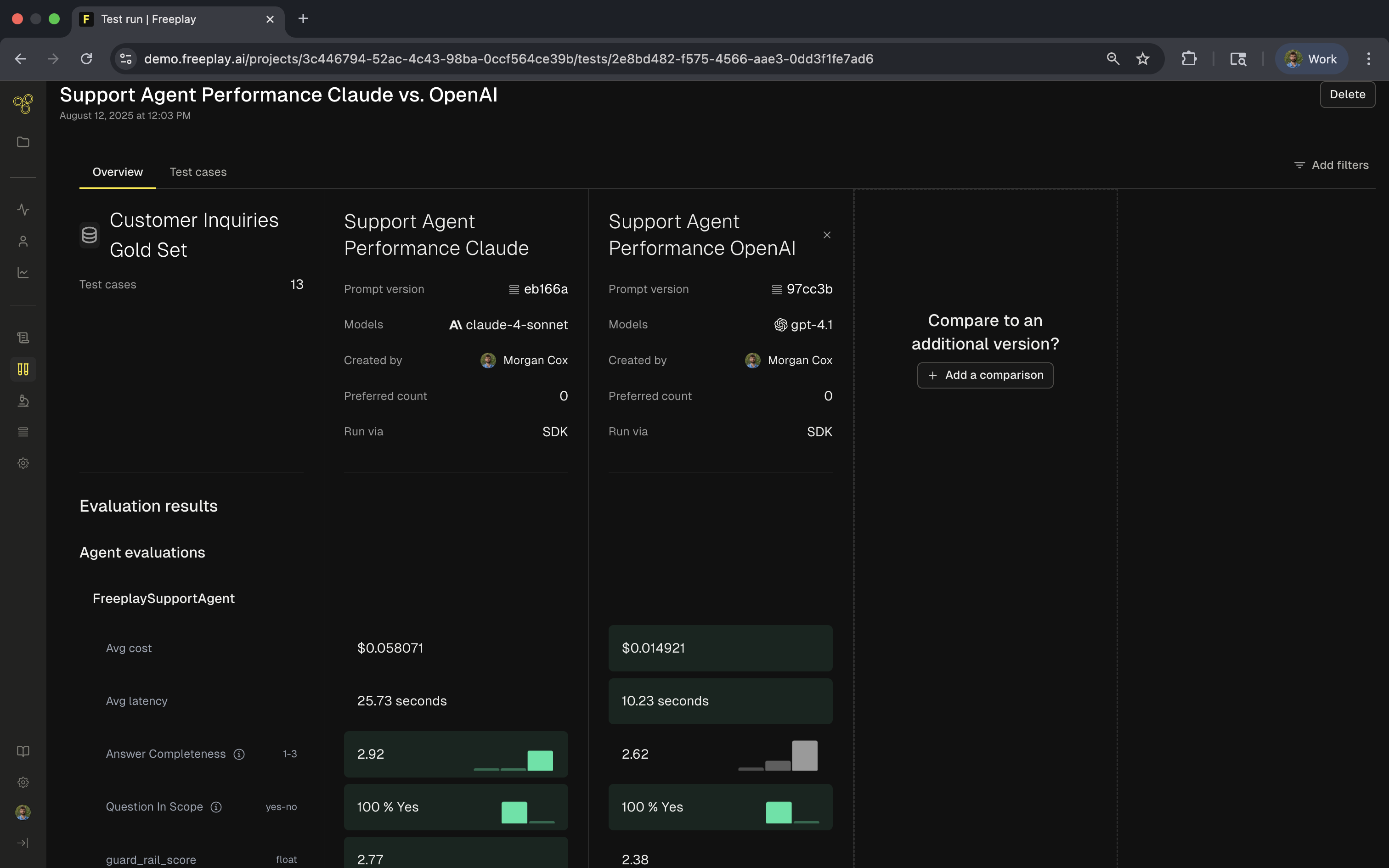
After running your tests, Freeplay provides comprehensive analysis at both the agent and component levels. The overview shows high-level metrics comparing different versions or models:
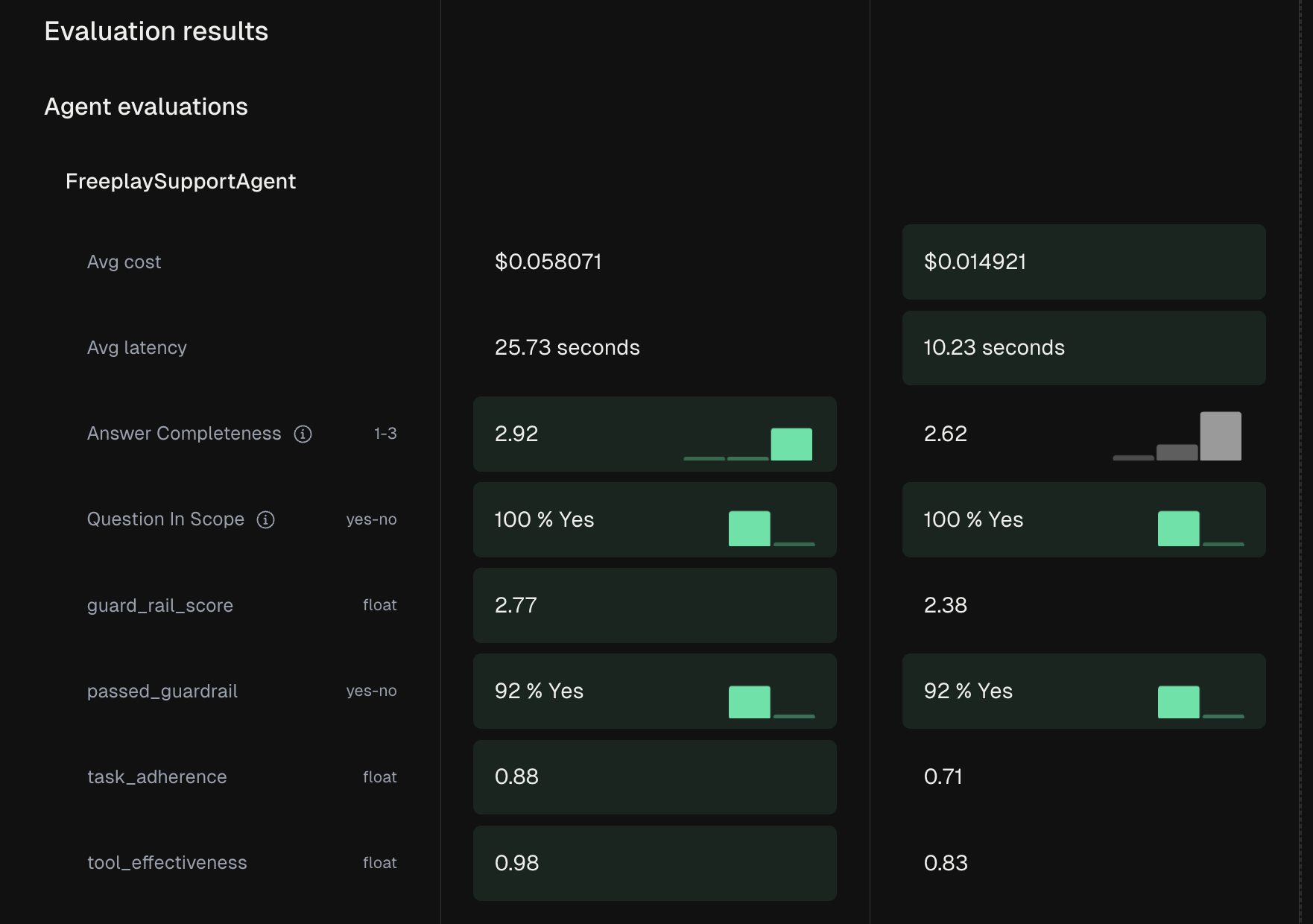
You can drill into specific evaluation categories to understand performance across different aspects of your system. Agent evaluations assess the complete workflow:
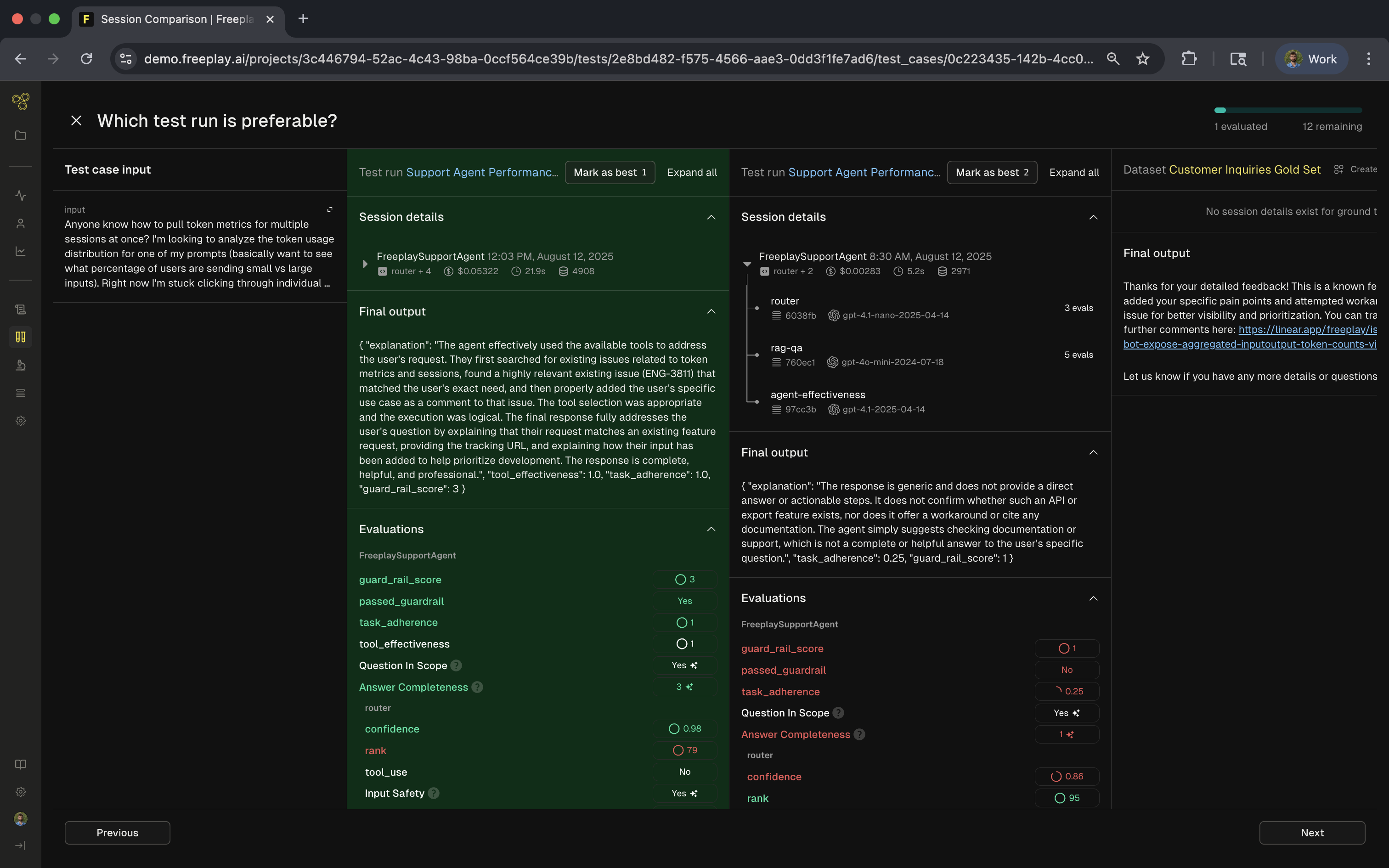
The row level view reveals how each component contributes to overall system performance. Notice in the example below how we have marked the Claude version as the winner. This view allows us to step through every completion in the dataset and compare side-by-side to see how they differ. You can also note under the session details what actions/steps were taken by the agent in each case during the end-to-end test:
## Best Practices
Include real user interactions that represent typical usage patterns, edge cases that challenge your system, and known failure scenarios that you've encountered. This realistic data ensures your tests catch actual problems users might face.
Run end-to-end tests at critical points in your development cycle. Execute them before deploying to production, after significant code changes, and as part of your CI/CD pipeline. Regular testing catches regressions early when they're easier to fix.
## Advanced Patterns
For multi-agent systems, test the collaboration and handoffs between agents:
```python python theme={null}
for test_case in test_run.trace_test_cases:
# Primary agent processes request
initial_response = primary_agent.process(test_case.input)
# Handoff to specialist if needed
if requires_specialist(initial_response):
final_response = specialist_agent.process(
test_case.input,
context=initial_response
)
```
For RAG pipelines, track each stage of the process:
```python python theme={null}
# Create trace for the complete pipeline
trace_info = session.create_trace(
input=query,
agent_name="rag_pipeline"
)
# Track retrieval, reranking, and generation
retrieved_docs = retrieval_system.search(query)
reranked_docs = reranker.rerank(query, retrieved_docs)
response = generate_response(query, reranked_docs)
trace_info.record_output(
output=response,
eval_results={
'retrieval_relevance': evaluate_retrieval(query, retrieved_docs),
'answer_quality': evaluate_answer(query, response)
}
)
```
***
[Test Runs](/core-concepts/test-runs/test-runs)
[Component Level Test Runs](/core-concepts/test-runs/component-level-test-runs)
 You can drill into specific evaluation categories to understand performance across different aspects of your system. Agent evaluations assess the complete workflow:
 The row level view reveals how each component contributes to overall system performance. Notice in the example below how we have marked the Claude version as the winner. This view allows us to step through every completion in the dataset and compare side-by-side to see how they differ. You can also note under the session details what actions/steps were taken by the agent in each case during the end-to-end test:
 ## Best Practices
Include real user interactions that represent typical usage patterns, edge cases that challenge your system, and known failure scenarios that you've encountered. This realistic data ensures your tests catch actual problems users might face.
Run end-to-end tests at critical points in your development cycle. Execute them before deploying to production, after significant code changes, and as part of your CI/CD pipeline. Regular testing catches regressions early when they're easier to fix.
## Advanced Patterns
For multi-agent systems, test the collaboration and handoffs between agents:
## Best Practices
Include real user interactions that represent typical usage patterns, edge cases that challenge your system, and known failure scenarios that you've encountered. This realistic data ensures your tests catch actual problems users might face.
Run end-to-end tests at critical points in your development cycle. Execute them before deploying to production, after significant code changes, and as part of your CI/CD pipeline. Regular testing catches regressions early when they're easier to fix.
## Advanced Patterns
For multi-agent systems, test the collaboration and handoffs between agents: