> ## Documentation Index
> Fetch the complete documentation index at: https://docs.freeplay.ai/llms.txt
> Use this file to discover all available pages before exploring further.
# JSON Mode
> Get valid JSON output from LLMs without enforcing a strict schema.
## When to use JSON mode
JSON mode is ideal for:
* **Flexible data structures**: When the exact output structure may vary based on input
* **Rapid prototyping**: Quick experimentation without defining formal schemas
* **Simple JSON needs**: Cases where valid JSON is sufficient without strict validation
**When to use structured outputs instead:**
* Production applications requiring guaranteed schema compliance
* Data that feeds directly into typed systems or databases
* Cases where validation and retry logic would be complex
See the [Structured Outputs documentation](/core-concepts/prompt-management/structured-outputs/structured-outputs-openai) for schema-enforced JSON output.
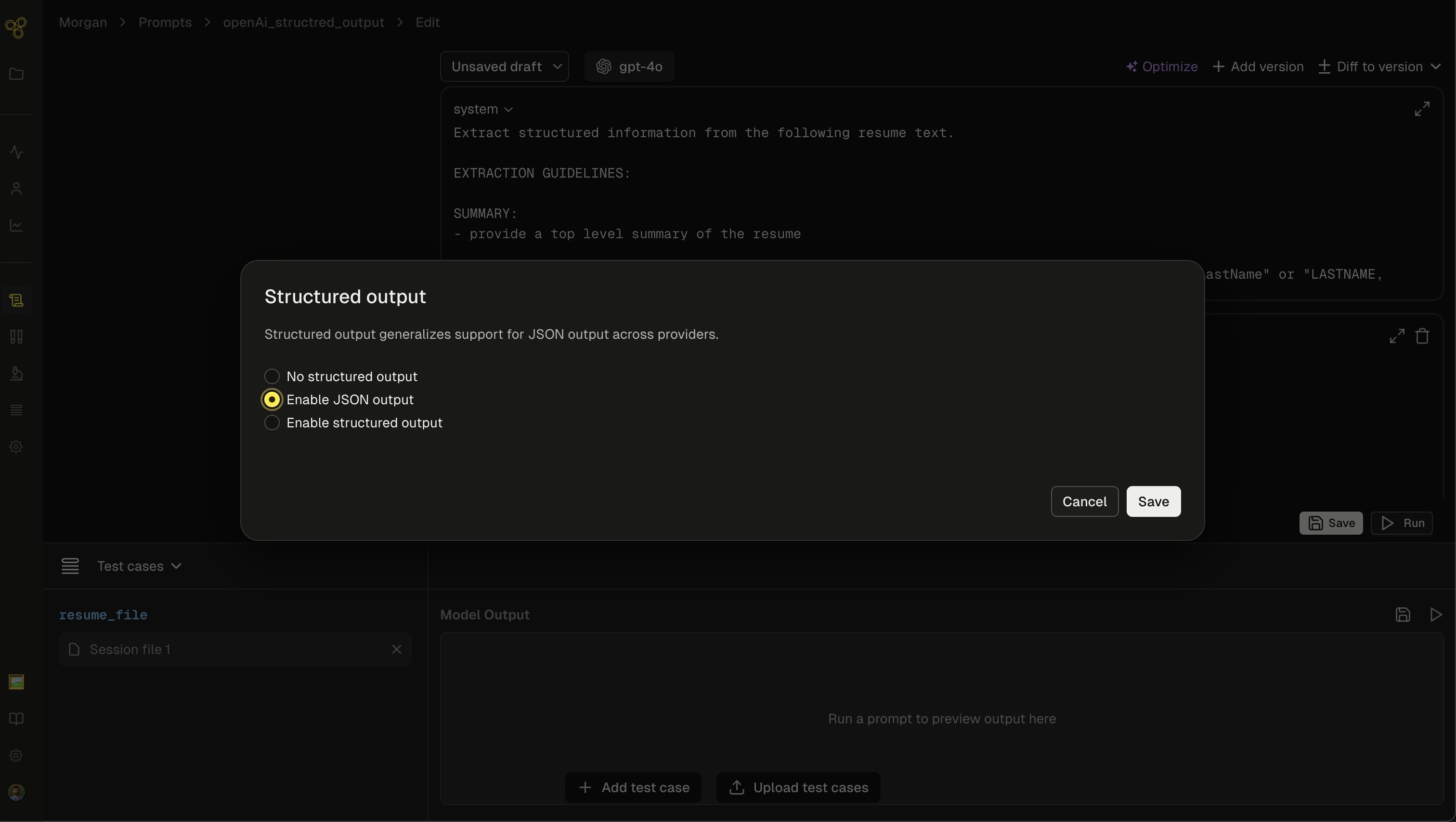
## Enabling JSON mode in Freeplay
### In the prompt editor
1. Open your prompt template in the Freeplay editor
2. Navigate to the output configuration section
3. Select "Enable JSON output"
4. Save your prompt template
 ### In your prompts
When using JSON mode, always include explicit instructions in your prompt to output JSON:
```
You are a helpful assistant that outputs JSON.
Extract the key information from the following text and return it as JSON.
Include fields for name, date, and main topics discussed.
Your response should look like:
{
"name": ,
"date": ,
"topics":
}
```
**Important**: The API will return an error if the string "JSON" doesn't appear somewhere in your messages when JSON mode is enabled.
## Best practices
### Always instruct the model
Include clear instructions in your system message or prompt:
```
Return your response as valid JSON with the following structure:
{
"summary": "brief summary here",
"key_points": ["point 1", "point 2"],
"sentiment": "positive/negative/neutral"
}
```
### Validate the output
JSON mode guarantees valid JSON syntax, but not a specific structure. Always validate the output:
```python python theme={null}
import json
try:
data = json.loads(response.choices[0].message.content)
# Validate expected fields
if "summary" not in data:
# Handle missing fields
pass
except json.JSONDecodeError: # Handle parse errors (rare with JSON mode)
pass
```
### Provide examples
For consistent output structures, include examples in your prompt:
```
Example output format:
{
"title": "Meeting Notes",
"date": "2024-10-15",
"attendees": ["Alice", "Bob"],
"action_items": [
{"task": "Review document", "owner": "Alice", "due": "2024-10-20"}
]
}
```
### Handle edge cases
JSON mode can fail in certain edge cases:
* **Token limit reached**: Output may be incomplete JSON
* **Model refuses**: Safety refusals may not be valid JSON
Always check `finish_reason`:
```python python theme={null}
if response.choices[0].finish_reason != "stop":
# Handle incomplete response
print(f"Response incomplete: {response.choices[0].finish_reason}")
```
## Recording to Freeplay
Record your JSON mode completions to Freeplay like any other completion:
**Python:**
```python python theme={null}
from freeplay import RecordPayload, CallInfo
# Record the completion
session = fp_client.sessions.create()
payload = RecordPayload(
project_id=project_id,
all_messages=[
\*formatted_prompt.llm_prompt,
{
"role": response.choices[0].message.role,
"content": response.choices[0].message.content,
}
],
inputs={"text": user_input},
session_info=session.session_info,
prompt_version_info=formatted_prompt.prompt_info,
call_info=CallInfo.from_prompt_info(formatted_prompt.prompt_info, start, end),
)
fp_client.recordings.create(payload)
```
## JSON mode vs structured outputs
| Feature | JSON Mode | Structured Outputs |
| -------------------------- | -------------------------- | -------------------------- |
| Valid JSON guaranteed | ✓ | ✓ |
| Schema compliance | ✗ | ✓ |
| Schema definition required | ✗ | ✓ |
| Flexibility | High | Lower (strict schema) |
| Model support | Broad | OpenAI gpt-4o+ only |
| Validation needed | ✓ (manual) | ✗ (automatic) |
| Best for | Flexible JSON, prototyping | Production, strict schemas |
**Recommendation**: Use structured outputs for production applications requiring reliable, schema-compliant data. Use JSON mode for prototyping or when you need flexible JSON without strict validation.
## Troubleshooting
**Issue**: Model not outputting JSON
* **Solution**: Ensure "JSON" appears in your prompt instructions. Add explicit JSON format instructions.
**Issue**: Incomplete JSON output
* **Solution**: Check `finish_reason`. If it's `length`, increase `max_tokens`. If it's `content_filter`, adjust your input.
**Issue**: Inconsistent output structure
* **Solution**: Provide clear examples in your prompt. Consider using structured outputs if you need guaranteed schema compliance.
***
[Structured Outputs (OpenAI)](/core-concepts/prompt-management/structured-outputs/structured-outputs-openai)
[Prompt Bundling](/core-concepts/prompt-management/prompt-bundling)
### In your prompts
When using JSON mode, always include explicit instructions in your prompt to output JSON:
```
You are a helpful assistant that outputs JSON.
Extract the key information from the following text and return it as JSON.
Include fields for name, date, and main topics discussed.
Your response should look like:
{
"name": ,
"date": ,
"topics":
}
```
**Important**: The API will return an error if the string "JSON" doesn't appear somewhere in your messages when JSON mode is enabled.
## Best practices
### Always instruct the model
Include clear instructions in your system message or prompt:
```
Return your response as valid JSON with the following structure:
{
"summary": "brief summary here",
"key_points": ["point 1", "point 2"],
"sentiment": "positive/negative/neutral"
}
```
### Validate the output
JSON mode guarantees valid JSON syntax, but not a specific structure. Always validate the output:
```python python theme={null}
import json
try:
data = json.loads(response.choices[0].message.content)
# Validate expected fields
if "summary" not in data:
# Handle missing fields
pass
except json.JSONDecodeError: # Handle parse errors (rare with JSON mode)
pass
```
### Provide examples
For consistent output structures, include examples in your prompt:
```
Example output format:
{
"title": "Meeting Notes",
"date": "2024-10-15",
"attendees": ["Alice", "Bob"],
"action_items": [
{"task": "Review document", "owner": "Alice", "due": "2024-10-20"}
]
}
```
### Handle edge cases
JSON mode can fail in certain edge cases:
* **Token limit reached**: Output may be incomplete JSON
* **Model refuses**: Safety refusals may not be valid JSON
Always check `finish_reason`:
```python python theme={null}
if response.choices[0].finish_reason != "stop":
# Handle incomplete response
print(f"Response incomplete: {response.choices[0].finish_reason}")
```
## Recording to Freeplay
Record your JSON mode completions to Freeplay like any other completion:
**Python:**
```python python theme={null}
from freeplay import RecordPayload, CallInfo
# Record the completion
session = fp_client.sessions.create()
payload = RecordPayload(
project_id=project_id,
all_messages=[
\*formatted_prompt.llm_prompt,
{
"role": response.choices[0].message.role,
"content": response.choices[0].message.content,
}
],
inputs={"text": user_input},
session_info=session.session_info,
prompt_version_info=formatted_prompt.prompt_info,
call_info=CallInfo.from_prompt_info(formatted_prompt.prompt_info, start, end),
)
fp_client.recordings.create(payload)
```
## JSON mode vs structured outputs
| Feature | JSON Mode | Structured Outputs |
| -------------------------- | -------------------------- | -------------------------- |
| Valid JSON guaranteed | ✓ | ✓ |
| Schema compliance | ✗ | ✓ |
| Schema definition required | ✗ | ✓ |
| Flexibility | High | Lower (strict schema) |
| Model support | Broad | OpenAI gpt-4o+ only |
| Validation needed | ✓ (manual) | ✗ (automatic) |
| Best for | Flexible JSON, prototyping | Production, strict schemas |
**Recommendation**: Use structured outputs for production applications requiring reliable, schema-compliant data. Use JSON mode for prototyping or when you need flexible JSON without strict validation.
## Troubleshooting
**Issue**: Model not outputting JSON
* **Solution**: Ensure "JSON" appears in your prompt instructions. Add explicit JSON format instructions.
**Issue**: Incomplete JSON output
* **Solution**: Check `finish_reason`. If it's `length`, increase `max_tokens`. If it's `content_filter`, adjust your input.
**Issue**: Inconsistent output structure
* **Solution**: Provide clear examples in your prompt. Consider using structured outputs if you need guaranteed schema compliance.
***
[Structured Outputs (OpenAI)](/core-concepts/prompt-management/structured-outputs/structured-outputs-openai)
[Prompt Bundling](/core-concepts/prompt-management/prompt-bundling)