> ## Documentation Index
> Fetch the complete documentation index at: https://docs.freeplay.ai/llms.txt
> Use this file to discover all available pages before exploring further.
# Filtering and Search
> Understand how Freeplay's filters work to build effective searches across your observability data.
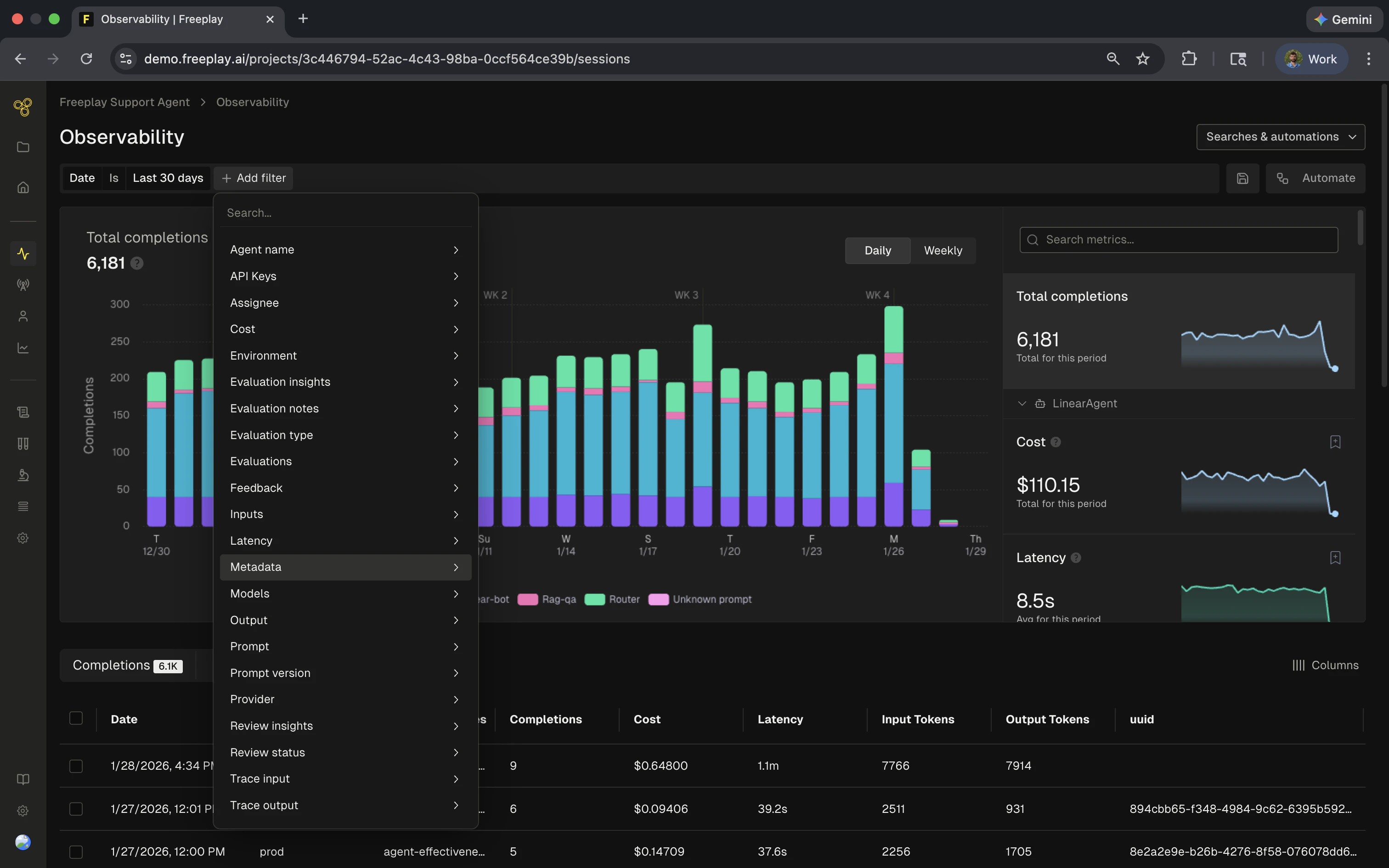 Freeplay's filtering system lets you search across millions of records quickly. Understanding how different field types are indexed and searched helps you build more effective filters and avoid unexpected results.
## How text search works
When you filter on text fields like inputs, outputs, or metadata values, Freeplay uses **tokenized phrase matching**. This is different from simple substring search and has important implications for how you construct your filters.
### Tokenization
Text is broken into individual words called **tokens**. During this process:
* Punctuation and special characters are removed
* Text is normalized (case is ignored)
* Words become searchable units
For example, the email `user@freeplay.ai` is tokenized into:
```
["user", "freeplay", "ai"]
```
The `@` and `.` characters are stripped and treated as word boundaries.
### Phrase matching
When you search, the tokens in your query must appear **adjacent and in order** in the indexed data. This is why the `contains` filter works differently than you might expect.
The `contains` filter searches for **complete tokens in sequence**, not arbitrary substrings. Searching for `free` will not match `freeplay` because `free` is not a complete token in the indexed text.
## Field types and their behavior
Different fields in Freeplay use different search behaviors depending on their data type:
| Type | Examples | Search Behavior |
| ---------------------- | ------------------------------------------------------------ | ----------------------------------------------------- |
| **Text fields** | Inputs, outputs, evaluation notes | Tokenized phrase matching via `contains` |
| **Categorical fields** | Model, provider, environment, prompt template, review status | Exact match selection |
| **Numeric fields** | Cost, latency, token counts | Range queries (greater than, less than, between) |
| **Key-value fields** | Custom metadata, feedback, trace inputs/outputs | Key matched exactly; value uses tokenized text search |
### Categorical fields
Fields like **model**, **provider**, **environment**, and **prompt template** use exact matching. You select from a predefined list of values, and only records with that exact value are returned. These filters are straightforward and don't have tokenization considerations.
### Numeric fields
Fields like **cost**, **latency**, and **token counts** support range queries. You can filter for values greater than, less than, equal to, or between specific numbers.
### Key-value fields
For structured data like **custom metadata** or **feedback**, the filter has two parts:
1. **Key name**: Matched exactly (e.g., `customer_email`)
2. **Value**: Uses tokenized text search
This means if you have metadata like `{"customer_email": "morgan@freeplay.ai"}`, you can:
* Filter on the exact key `customer_email`
* Search the value using tokenized matching (same rules as text fields)
## Understanding the "contains" filter
The `contains` filter is the most common source of confusion. Here's what it actually means:
`contains` means "contains these complete tokens in this order" — not "contains this substring anywhere."
### What works vs. what doesn't
Given the indexed value `user@freeplay.ai` (tokenized to `["user", "freeplay", "ai"]`):
| Search Query | Result | Why |
| ------------------ | -------- | ---------------------------------------------------------------------------------------------------------------------------------- |
| `user` | Matches | Complete token |
| `freeplay` | Matches | Complete token |
| `ai` | Matches | Complete token |
| `morgan freeplay` | Matches | Tokens in correct order |
| `freeplay.ai` | Matches | Tokenizes to `["freeplay", "ai"]` which matches |
| `freeplay ai` | Matches | Same as above |
| `@freeplay.ai` | Matches | `@` is stripped; tokenizes to `["freeplay", "ai"]` |
| `user@freeplay.ai` | Matches | Full value always matches |
| `use` | No match | Partial token |
| `free` | No match | Partial token |
| `@freeplay` | No match | Tokenizes to `["freeplay"]` but searches require the token sequence; the `@` makes it look for a token boundary that doesn't align |
| `ai freeplay` | No match | Tokens in wrong order |
## Common search scenarios
### Email addresses
Email addresses are tokenized at the `@` and `.` characters.
**Example**: `someone@freeplay.ai` becomes `["someone", "freeplay", "ai"]`
**Searches that work:**
* `someone` - complete token
* `freeplay` - complete token
* `freeplay.ai` or `freeplay ai` - token sequence
* `someone@freeplay.ai` - full value
* `@freeplay.ai` - tokenizes to match `["freeplay", "ai"]`
**Searches that don't work:**
* `@freeplay` - doesn't match because the search pattern doesn't align with token boundaries
* `play` - partial token, not indexed separately
* `one` - partial token
### Identifiers with special characters
Special characters act as token boundaries, which can cause **unexpected matches**.
**Example**: The value `user-123` is tokenized to `["user", "123"]`
This means all of the following will match the same records:
* `user-123`
* `user 123`
* `user_123`
* `user/123`
They all tokenize to the same sequence: `["user", "123"]`
If you need to distinguish between `user-123` and `user_123`, tokenized search won't help. Consider using a categorical field or adding a separate identifier field with exact matching.
### Custom metadata
When filtering on custom metadata:
1. Select the metadata key (exact match)
2. Enter the value to search (tokenized matching)
**Example**: If you have sessions with `{"user_type": "premium-enterprise"}`:
* Key: `user_type` (must match exactly)
* Value search for `premium` will match
* Value search for `enterprise` will match
* Value search for `prem` will not match (partial token)
### Evaluation results and notes
Evaluation result values and note content also use tokenized search:
* Filter by evaluation name (categorical/exact match)
* Search within results or notes (tokenized text search)
## Tips for effective filtering
\*\*Log Useful Info: \*\*When recording metadata, feedback or additional info to Freeplay, break it down into parts that your team may need to search by. This can help teams find useful information quickly!
**Use complete tokens**: When searching text fields, use full words rather than partial strings. If you're looking for emails from a domain, search for the domain name (`freeplay`) rather than a partial match (`@freeplay`).
**Combine filters to narrow results**: If tokenization gives you too many matches, add additional filters (time range, environment, model) to narrow down results.
Freeplay's filtering system lets you search across millions of records quickly. Understanding how different field types are indexed and searched helps you build more effective filters and avoid unexpected results.
## How text search works
When you filter on text fields like inputs, outputs, or metadata values, Freeplay uses **tokenized phrase matching**. This is different from simple substring search and has important implications for how you construct your filters.
### Tokenization
Text is broken into individual words called **tokens**. During this process:
* Punctuation and special characters are removed
* Text is normalized (case is ignored)
* Words become searchable units
For example, the email `user@freeplay.ai` is tokenized into:
```
["user", "freeplay", "ai"]
```
The `@` and `.` characters are stripped and treated as word boundaries.
### Phrase matching
When you search, the tokens in your query must appear **adjacent and in order** in the indexed data. This is why the `contains` filter works differently than you might expect.
The `contains` filter searches for **complete tokens in sequence**, not arbitrary substrings. Searching for `free` will not match `freeplay` because `free` is not a complete token in the indexed text.
## Field types and their behavior
Different fields in Freeplay use different search behaviors depending on their data type:
| Type | Examples | Search Behavior |
| ---------------------- | ------------------------------------------------------------ | ----------------------------------------------------- |
| **Text fields** | Inputs, outputs, evaluation notes | Tokenized phrase matching via `contains` |
| **Categorical fields** | Model, provider, environment, prompt template, review status | Exact match selection |
| **Numeric fields** | Cost, latency, token counts | Range queries (greater than, less than, between) |
| **Key-value fields** | Custom metadata, feedback, trace inputs/outputs | Key matched exactly; value uses tokenized text search |
### Categorical fields
Fields like **model**, **provider**, **environment**, and **prompt template** use exact matching. You select from a predefined list of values, and only records with that exact value are returned. These filters are straightforward and don't have tokenization considerations.
### Numeric fields
Fields like **cost**, **latency**, and **token counts** support range queries. You can filter for values greater than, less than, equal to, or between specific numbers.
### Key-value fields
For structured data like **custom metadata** or **feedback**, the filter has two parts:
1. **Key name**: Matched exactly (e.g., `customer_email`)
2. **Value**: Uses tokenized text search
This means if you have metadata like `{"customer_email": "morgan@freeplay.ai"}`, you can:
* Filter on the exact key `customer_email`
* Search the value using tokenized matching (same rules as text fields)
## Understanding the "contains" filter
The `contains` filter is the most common source of confusion. Here's what it actually means:
`contains` means "contains these complete tokens in this order" — not "contains this substring anywhere."
### What works vs. what doesn't
Given the indexed value `user@freeplay.ai` (tokenized to `["user", "freeplay", "ai"]`):
| Search Query | Result | Why |
| ------------------ | -------- | ---------------------------------------------------------------------------------------------------------------------------------- |
| `user` | Matches | Complete token |
| `freeplay` | Matches | Complete token |
| `ai` | Matches | Complete token |
| `morgan freeplay` | Matches | Tokens in correct order |
| `freeplay.ai` | Matches | Tokenizes to `["freeplay", "ai"]` which matches |
| `freeplay ai` | Matches | Same as above |
| `@freeplay.ai` | Matches | `@` is stripped; tokenizes to `["freeplay", "ai"]` |
| `user@freeplay.ai` | Matches | Full value always matches |
| `use` | No match | Partial token |
| `free` | No match | Partial token |
| `@freeplay` | No match | Tokenizes to `["freeplay"]` but searches require the token sequence; the `@` makes it look for a token boundary that doesn't align |
| `ai freeplay` | No match | Tokens in wrong order |
## Common search scenarios
### Email addresses
Email addresses are tokenized at the `@` and `.` characters.
**Example**: `someone@freeplay.ai` becomes `["someone", "freeplay", "ai"]`
**Searches that work:**
* `someone` - complete token
* `freeplay` - complete token
* `freeplay.ai` or `freeplay ai` - token sequence
* `someone@freeplay.ai` - full value
* `@freeplay.ai` - tokenizes to match `["freeplay", "ai"]`
**Searches that don't work:**
* `@freeplay` - doesn't match because the search pattern doesn't align with token boundaries
* `play` - partial token, not indexed separately
* `one` - partial token
### Identifiers with special characters
Special characters act as token boundaries, which can cause **unexpected matches**.
**Example**: The value `user-123` is tokenized to `["user", "123"]`
This means all of the following will match the same records:
* `user-123`
* `user 123`
* `user_123`
* `user/123`
They all tokenize to the same sequence: `["user", "123"]`
If you need to distinguish between `user-123` and `user_123`, tokenized search won't help. Consider using a categorical field or adding a separate identifier field with exact matching.
### Custom metadata
When filtering on custom metadata:
1. Select the metadata key (exact match)
2. Enter the value to search (tokenized matching)
**Example**: If you have sessions with `{"user_type": "premium-enterprise"}`:
* Key: `user_type` (must match exactly)
* Value search for `premium` will match
* Value search for `enterprise` will match
* Value search for `prem` will not match (partial token)
### Evaluation results and notes
Evaluation result values and note content also use tokenized search:
* Filter by evaluation name (categorical/exact match)
* Search within results or notes (tokenized text search)
## Tips for effective filtering
\*\*Log Useful Info: \*\*When recording metadata, feedback or additional info to Freeplay, break it down into parts that your team may need to search by. This can help teams find useful information quickly!
**Use complete tokens**: When searching text fields, use full words rather than partial strings. If you're looking for emails from a domain, search for the domain name (`freeplay`) rather than a partial match (`@freeplay`).
**Combine filters to narrow results**: If tokenization gives you too many matches, add additional filters (time range, environment, model) to narrow down results.