> ## Documentation Index
> Fetch the complete documentation index at: https://docs.freeplay.ai/llms.txt
> Use this file to discover all available pages before exploring further.
# Sessions, Traces, and Completions
> Understand Freeplay's three-level hierarchy for organizing your AI application logs: sessions, traces, and completions.
When it comes to Observability in Freeplay, there are three related objects to understand. From low to high level abstractions, there are:
* **Completions:** Atomic LLM calls made up of a prompt and a response or output from a model.
* **Traces:** *Optionally* used to group related completions, e.g. when multiple completions are used to generate chat turn or single agent flow
* **Sessions:** The container for all completions and traces that make up a customer interaction. These can be 1:1 with completions for a simple feature that just uses one prompt, or they can be very large at times e.g. an entire conversation thread between a single user and a chatbot over multiple hours.
# Completions
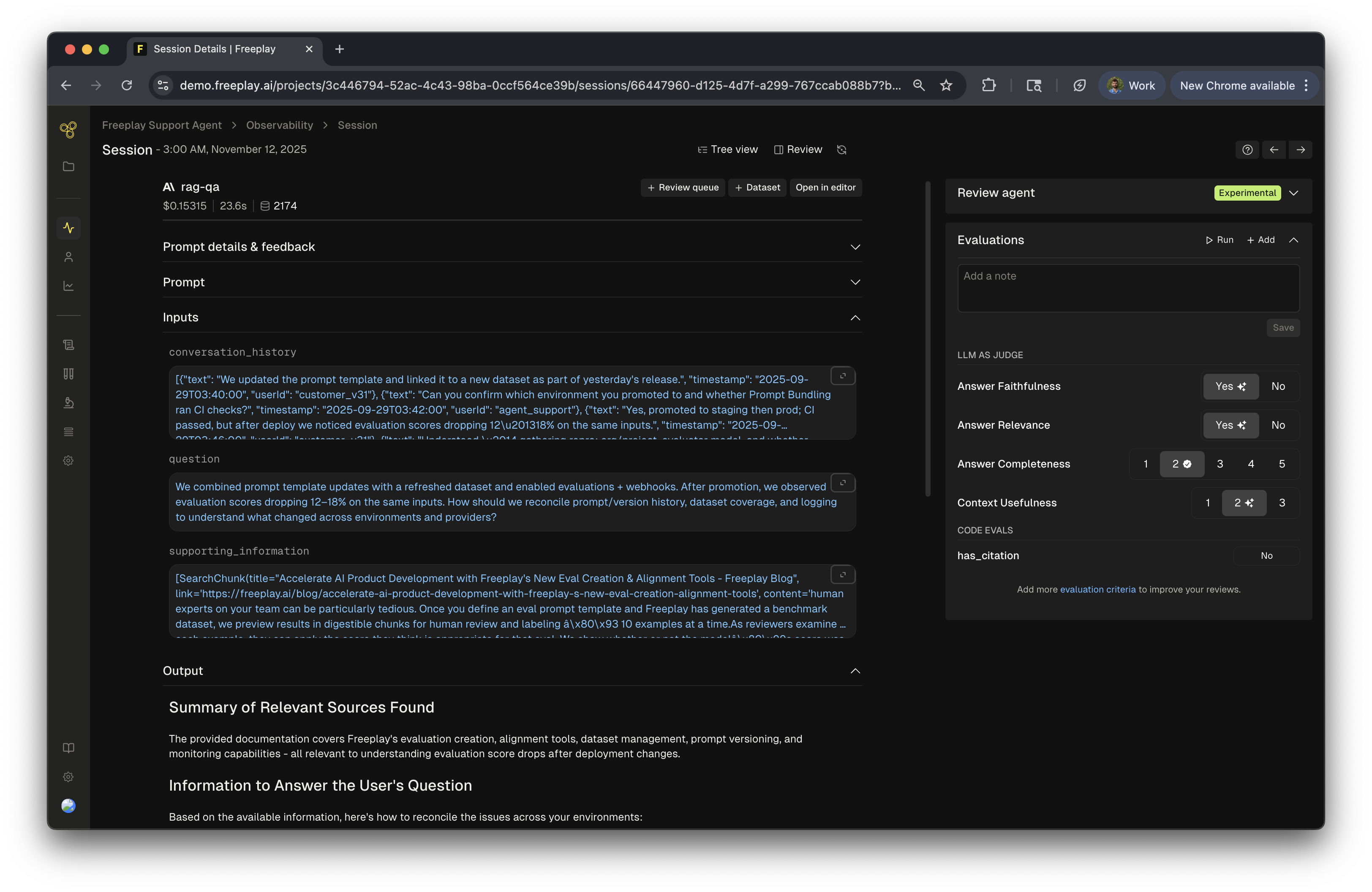 The core, atomic unit for observability in Freeplay is a completion. A completion represents a single call to an LLM provider.
In Freeplay each completion is tied to a single prompt template version.
Most LLM applications involve a collection of completions to deliver a single outcome or user experience. This is where Sessions and Traces come into play: They provide a way to group completions in whatever way makes sense for your application logic.
# Traces
The core, atomic unit for observability in Freeplay is a completion. A completion represents a single call to an LLM provider.
In Freeplay each completion is tied to a single prompt template version.
Most LLM applications involve a collection of completions to deliver a single outcome or user experience. This is where Sessions and Traces come into play: They provide a way to group completions in whatever way makes sense for your application logic.
# Traces
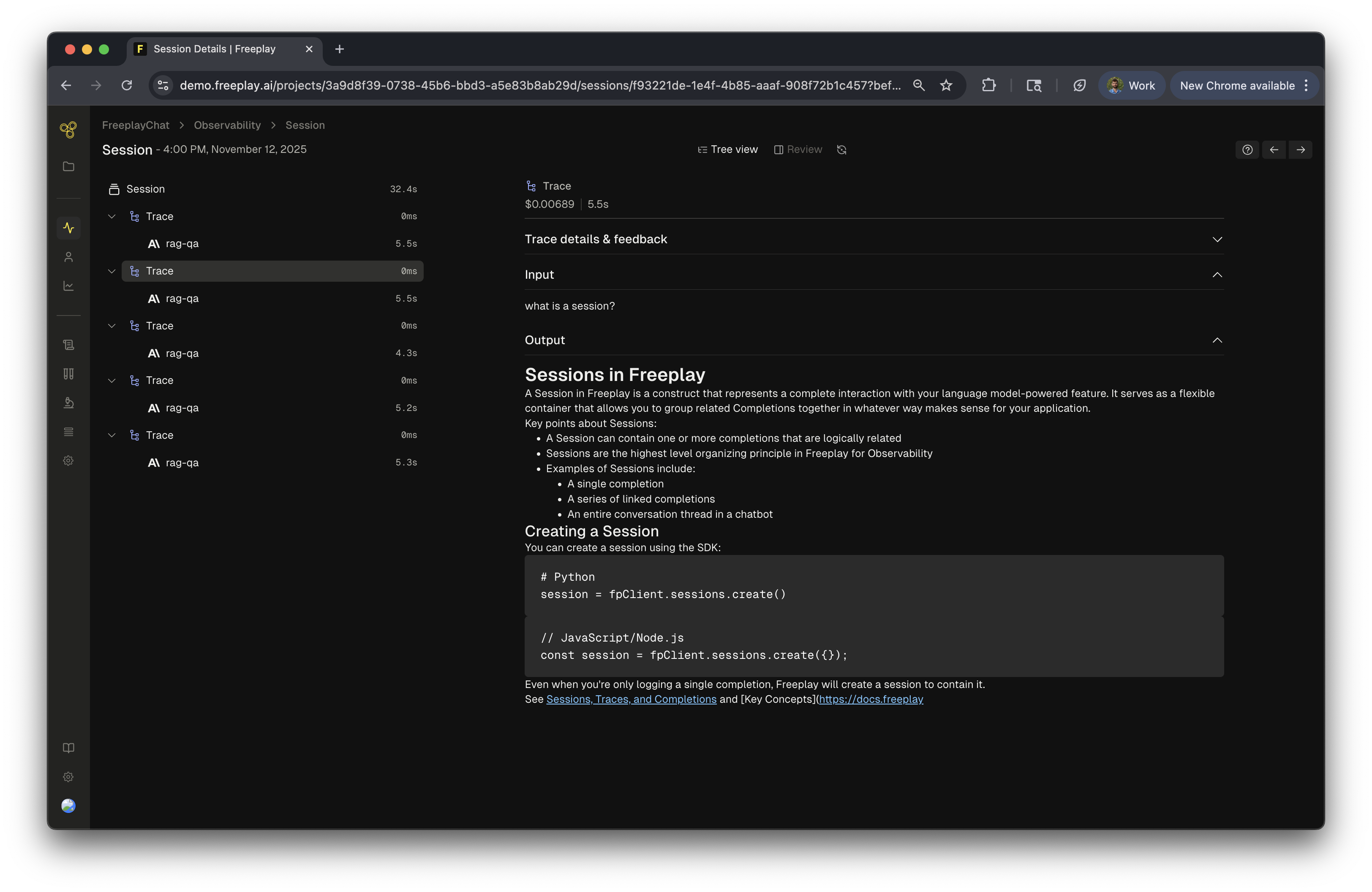 Traces are the next level in the hierarchy. They can be *optionally* used to structure and visualize the logical behavior of your application within a Session. We do not recommend using traces for simple applications, e.g. if your user experience relies on running a single prompt one time.
Traces are helpful when you need a more fine-grained way to group completions within a Session. A trace can contain one or more completions, and a session can contain one or more traces.
In some applications, multiple LLM calls (completions) are made to compute a single output for the user. Consider an example in which a system takes in a user question, generates a query to retrieve data (Completion A), and then passes that data into another LLM call to generate the answer (Completion B). Traces allow you to bundle together completions A and B to express the relationship between them.
For more detail on implementation of Traces see our [SDK Docs](/freeplay-sdk#traces) and a [Full Code Recipe](/developer-resources/recipes/record-traces).
While all completions must be tied to a session, traces are entirely optional. You do not need to use them if they don't make sense in the context of your application logic.
Note that there is a special case for logging traces as part of [multi-turn chatbots](/practical-guides/multi-turn-chat-support) that lets you pass an `input_question` and `output_answer` to render the start and end of a chat turn between a user and a bot. Traces *must* be used to take advantage of this feature.
# Sessions
Traces are the next level in the hierarchy. They can be *optionally* used to structure and visualize the logical behavior of your application within a Session. We do not recommend using traces for simple applications, e.g. if your user experience relies on running a single prompt one time.
Traces are helpful when you need a more fine-grained way to group completions within a Session. A trace can contain one or more completions, and a session can contain one or more traces.
In some applications, multiple LLM calls (completions) are made to compute a single output for the user. Consider an example in which a system takes in a user question, generates a query to retrieve data (Completion A), and then passes that data into another LLM call to generate the answer (Completion B). Traces allow you to bundle together completions A and B to express the relationship between them.
For more detail on implementation of Traces see our [SDK Docs](/freeplay-sdk#traces) and a [Full Code Recipe](/developer-resources/recipes/record-traces).
While all completions must be tied to a session, traces are entirely optional. You do not need to use them if they don't make sense in the context of your application logic.
Note that there is a special case for logging traces as part of [multi-turn chatbots](/practical-guides/multi-turn-chat-support) that lets you pass an `input_question` and `output_answer` to render the start and end of a chat turn between a user and a bot. Traces *must* be used to take advantage of this feature.
# Sessions
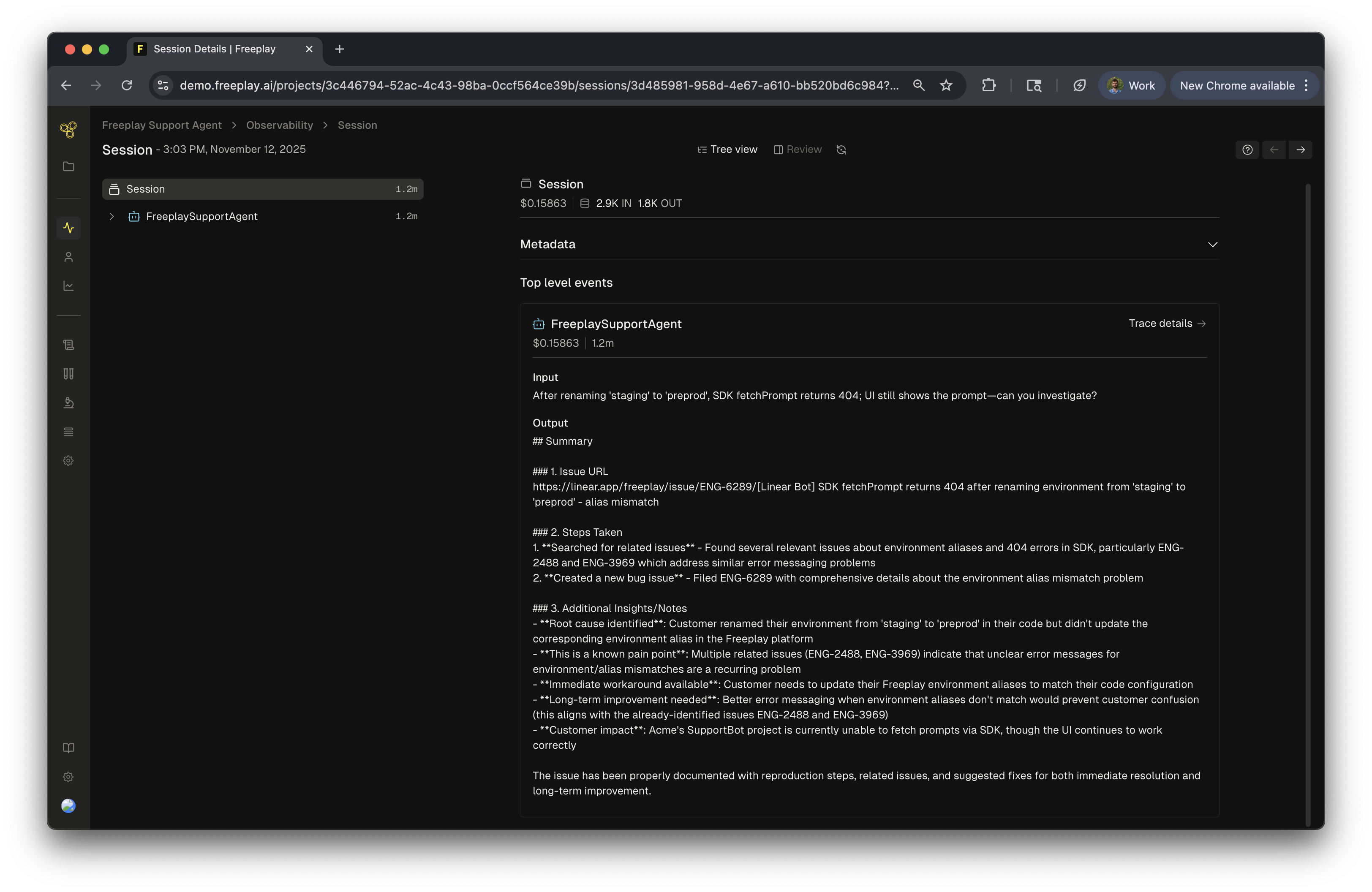 Sessions are the highest level organizing principle in Freeplay for Observability. A session can contain one or more completions that are logically related to each other. We create a session every time you write logs to Freeplay, even when there's only one completion.
The simplest example of grouping completions into a session might be multiple user questions in the context of a single chatbot conversation. Each question results in a completion — a single call to an LLM provider to answer the question. Each of those completions can be logged together in a session to denote their relationship to each other (i.e all being part of the same conversation thread).
For more detail on recording completions, traces or sessions see our [SDK Docs](/freeplay-sdk#record-an-llm-interaction).
## Sessions View
Sessions are the highest level organizing principle in Freeplay for Observability. A session can contain one or more completions that are logically related to each other. We create a session every time you write logs to Freeplay, even when there's only one completion.
The simplest example of grouping completions into a session might be multiple user questions in the context of a single chatbot conversation. Each question results in a completion — a single call to an LLM provider to answer the question. Each of those completions can be logged together in a session to denote their relationship to each other (i.e all being part of the same conversation thread).
For more detail on recording completions, traces or sessions see our [SDK Docs](/freeplay-sdk#record-an-llm-interaction).
## Sessions View
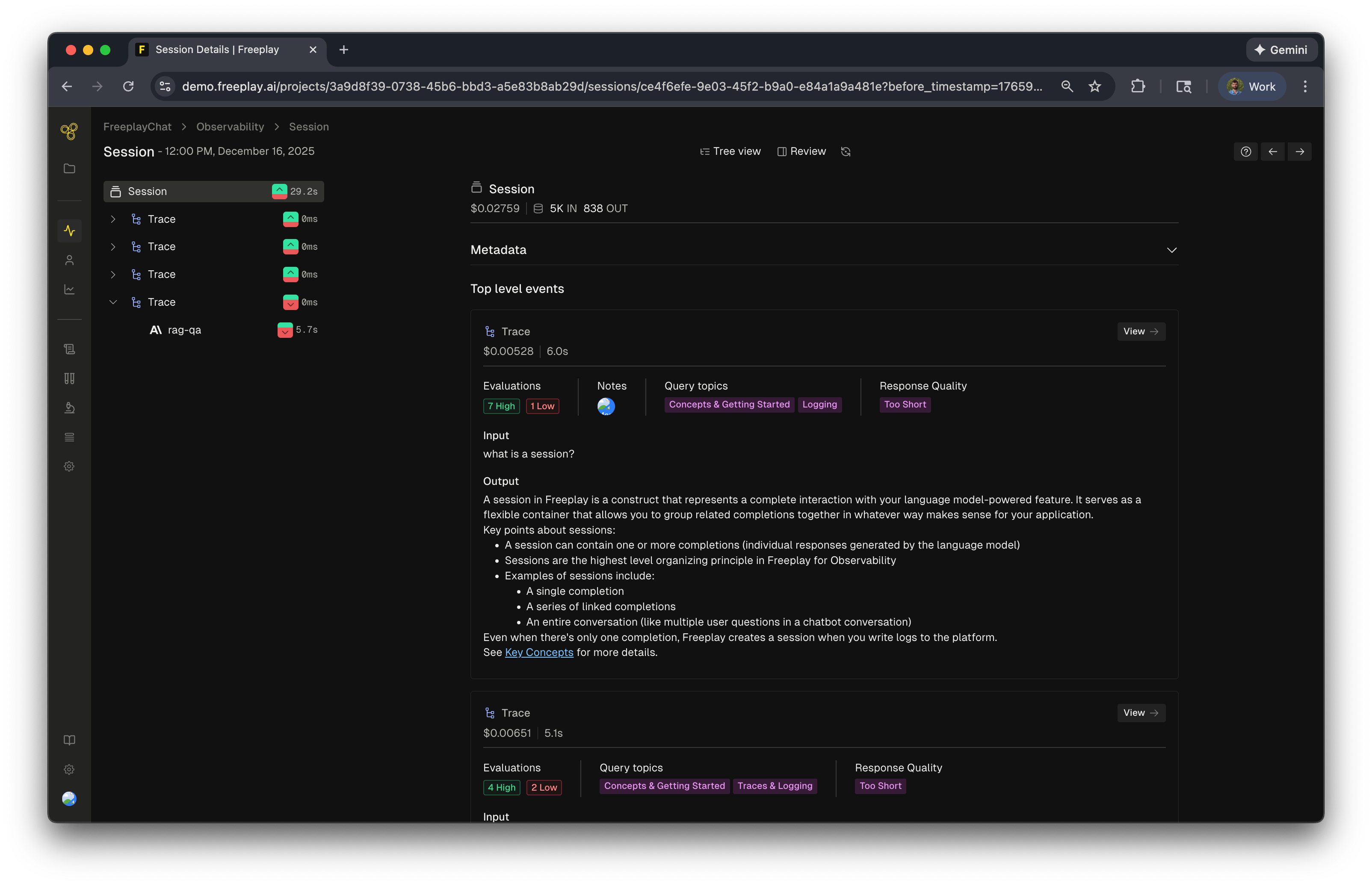 The Session view in Freeplay helps teams quickly identify and diagnose issues in their LLM applications. As shown in the image above from a chatbot session, the interface provides a comprehensive overview of everything that happened during a session:
1. Left sidebar navigation displays the hierarchical structure of your session, showing multiple traces with color-coded indicators that reveal evaluation performance at a glance (green for passing, red for failing evaluations)
2. Top-level session metrics show aggregated information including total cost (\$0.002759), token usage (5K input, 838 output), and overall evaluation results
3. Individual trace details present evaluation breakdowns (e.g., "7 High, 1 Low"), associated notes, query topics, and response quality assessments for each interaction in the conversation
4. Full context display shows the complete input and output for each trace, making it easy to understand what the user asked and how the system responded
This structured view allows teams to prioritize where to focus their attention. In the example shown, you can quickly see that one trace has a low evaluation score, with issues flagged in "Response Quality" (marked as "Too Short"). This makes it easy to identify which specific interaction in a multi-turn conversation needs investigation — all without leaving the session view. This approach makes debugging and quality assurance faster and more efficient.
**API Reference**: Key endpoints for working with observability data:
* **Completions**: [Record Completion](/developer-resources/api-reference#completions), [Search Completions](/developer-resources/api-reference#search-api)
* **Traces**: [Record Trace](/developer-resources/api-reference#traces), [Search Traces](/developer-resources/api-reference#search-api)
* **Sessions**: [List Sessions](/developer-resources/api-reference#sessions), [Search Sessions](/developer-resources/api-reference#search-api)
### What's next
Now that you understand how to build Sessions and Traces with Completions, explore these resources:
* [Multi-Turn Chatbot Support](/practical-guides/multi-turn-chat-support) - Implement conversation tracking
* [Agents](/practical-guides/agents) - Structure complex agent workflows
* [Glossary](/resources/glossary) - Definitions of key Freeplay terms
The Session view in Freeplay helps teams quickly identify and diagnose issues in their LLM applications. As shown in the image above from a chatbot session, the interface provides a comprehensive overview of everything that happened during a session:
1. Left sidebar navigation displays the hierarchical structure of your session, showing multiple traces with color-coded indicators that reveal evaluation performance at a glance (green for passing, red for failing evaluations)
2. Top-level session metrics show aggregated information including total cost (\$0.002759), token usage (5K input, 838 output), and overall evaluation results
3. Individual trace details present evaluation breakdowns (e.g., "7 High, 1 Low"), associated notes, query topics, and response quality assessments for each interaction in the conversation
4. Full context display shows the complete input and output for each trace, making it easy to understand what the user asked and how the system responded
This structured view allows teams to prioritize where to focus their attention. In the example shown, you can quickly see that one trace has a low evaluation score, with issues flagged in "Response Quality" (marked as "Too Short"). This makes it easy to identify which specific interaction in a multi-turn conversation needs investigation — all without leaving the session view. This approach makes debugging and quality assurance faster and more efficient.
**API Reference**: Key endpoints for working with observability data:
* **Completions**: [Record Completion](/developer-resources/api-reference#completions), [Search Completions](/developer-resources/api-reference#search-api)
* **Traces**: [Record Trace](/developer-resources/api-reference#traces), [Search Traces](/developer-resources/api-reference#search-api)
* **Sessions**: [List Sessions](/developer-resources/api-reference#sessions), [Search Sessions](/developer-resources/api-reference#search-api)
### What's next
Now that you understand how to build Sessions and Traces with Completions, explore these resources:
* [Multi-Turn Chatbot Support](/practical-guides/multi-turn-chat-support) - Implement conversation tracking
* [Agents](/practical-guides/agents) - Structure complex agent workflows
* [Glossary](/resources/glossary) - Definitions of key Freeplay terms